

👋 Hi there, I’m Justin. Welcome to another edition of SaaS Decoded. Each week, I publish an in-depth, actionable guide to help SaaS founders and operators grow their businesses.
Hey friends,
In this week’s post I’m going to teach you how to build an AI-friendly “brain” for your business that AI agents can use it to make you more money.
If you’re motivated to use your company’s unique knowledge and AI in meaningful ways, this guide is just what you need.
By the end of the post, you’ll have learnt the following:
Why you need a “brain” for your startup in the AI era.
What is an MCP server and why should I care?
What to look for in an internal knowledge base solution.
How Slite, Notion, Confluence, and Guru stack up against each other.
How to connect a knowledge base to AI tools, specifically Viktor and n8n.
How to set up 6 AI workflows that use your company’s unique knowledge.
If you make it to the end of this post, you’ll also know the exact steps, prompts and data you need to set up these 6 AI workflows:
Send a list every Monday of software that’s up for renewal that week (save 💵)
Speed up new employee onboarding (save 🕝 & make 💵)
Remind team members of non-work days in the coming week (nice to have for employees 🎉)
Use AI to pull answers to frequently asked questions and draft replies (save 🕝 & 💵)
Once a month share a summary of last month’s bank statement (save 💵)
Once a week get a content digest of relevant industry news shared with the team in Slack (make & save 💵)
This is long post (over 4,500 words) written as a step-by-step guide for SaaS businesses that don’t have a knowledge base and want to go from zero to AI-driven workflows using their unique knowledge.
If you already use any of the 4 knowledge base solutions I cover in this post (or an AI-friendly alternative), feel free to skip straight to step #3 (about a 3rd of the way down).
If today you don’t have an internal knowledge base in your business, let’s start off by answering the most obvious question.
Why does my startup need a “brain” and what the hell is an MCP server?
We are now living in the AI era but most SaaS startups are either not using AI at all, or using it to create new things.
Claude, Cursor, Lovable and many other agentic AI tools are exploding in popularity for a good reason; they are incredibly powerful tools for creating new things.
Where businesses are falling short is in leveraging their unique knowledge and AI in meaningful ways.
AI needs data to perform its “magic”. The one source of data the AI tools you use don’t have is your own. Therefore, until the AI tools you use have access to a central knowledge base that houses your unique data, you will be missing value.
Once you have your company’s unique knowledge in an AI-friendly knowledge base, we can connect it to AI tools and run workflows that leverage that data.
Getting to this end point is a 4 step process:
Step #1 - Adopt an AI-friendly knowledge base
Step #2 - Add your unique knowledge to your knowledge base
Step #3 - Connect your knowledge base’s MCP server to your AI tools
Step #4 - Set up AI-driven workflows
The way AI agents communicate with 3rd party tools, such as knowledge base tools like Notion, Slite and Confluence, is done via APIs connected to an MCP server.
MCP, or Model Context Protocol, is often called the “USB-C for AI”. Just as USB-C replaced dozens of different charging cables with one standard, MCP allows AI agents to connect to any data source without developers having to write custom code for every single integration.
If you’d like a deeper breakdown of what an MCP server is and how AI works with it, the video below does a good job.
So if we are going to implement a “brain” in our startup, we need a knowledge base solution which has MCP server support, thus making it “AI-friendly”.
Step #1: Adopt an AI-friendly knowledge base
For this post I researched 4 popular knowledge base tools, Notion, Slite, Confluence and Guru.
I’ve worked with all 4 throughout my career and been using Slite on a weekly basis for the past few years.
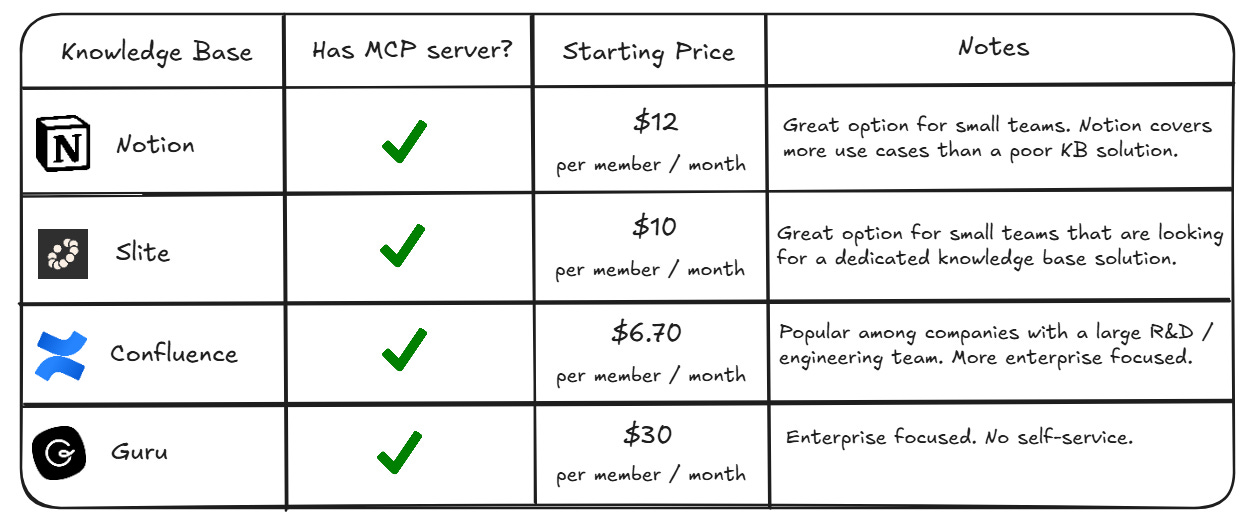
All 4 solutions have MCP server support which was a key consideration. Other considerations are price, the positioning of the solution (SMB vs. Enterprise), and if we want a dedicated knowledge base tool, or something more robust.
Notion
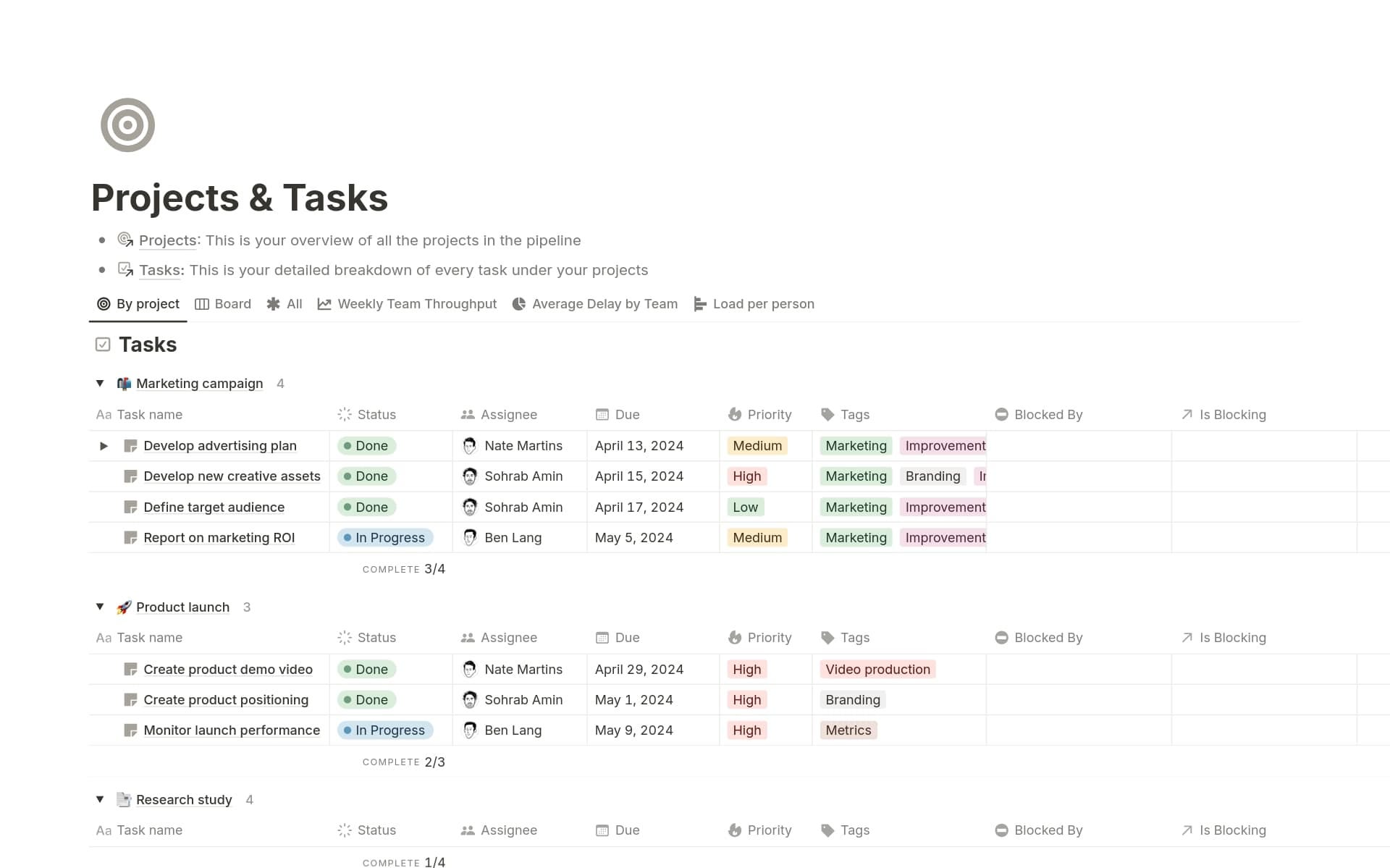
Notion is a multi-billion dollar company with a cult following that is a very popular knowledge base tool for early stage businesses.
I’ve personally never used Notion as a company knowledge base but have worked with businesses that have and it’s a great option.
It’s affordable, highly flexible, supports teams of all sizes, and has become a lot more AI-focused over the last 12 months.
Where I feel Notion falls a bit short is on focus.
Notion isn’t a pure knowledge base solution but rather a collection of tools that can work together. It’s more like an online “operating system” for your business where project management, task to-dos, documentation, calendars and databases live.
Notion is now leaning heavily into AI automation, bots and agentic workflows which may give it an edge over some of the other tools on the list; but then again it could also waterdown its strengths as a low-friction knowledge base.
Slite
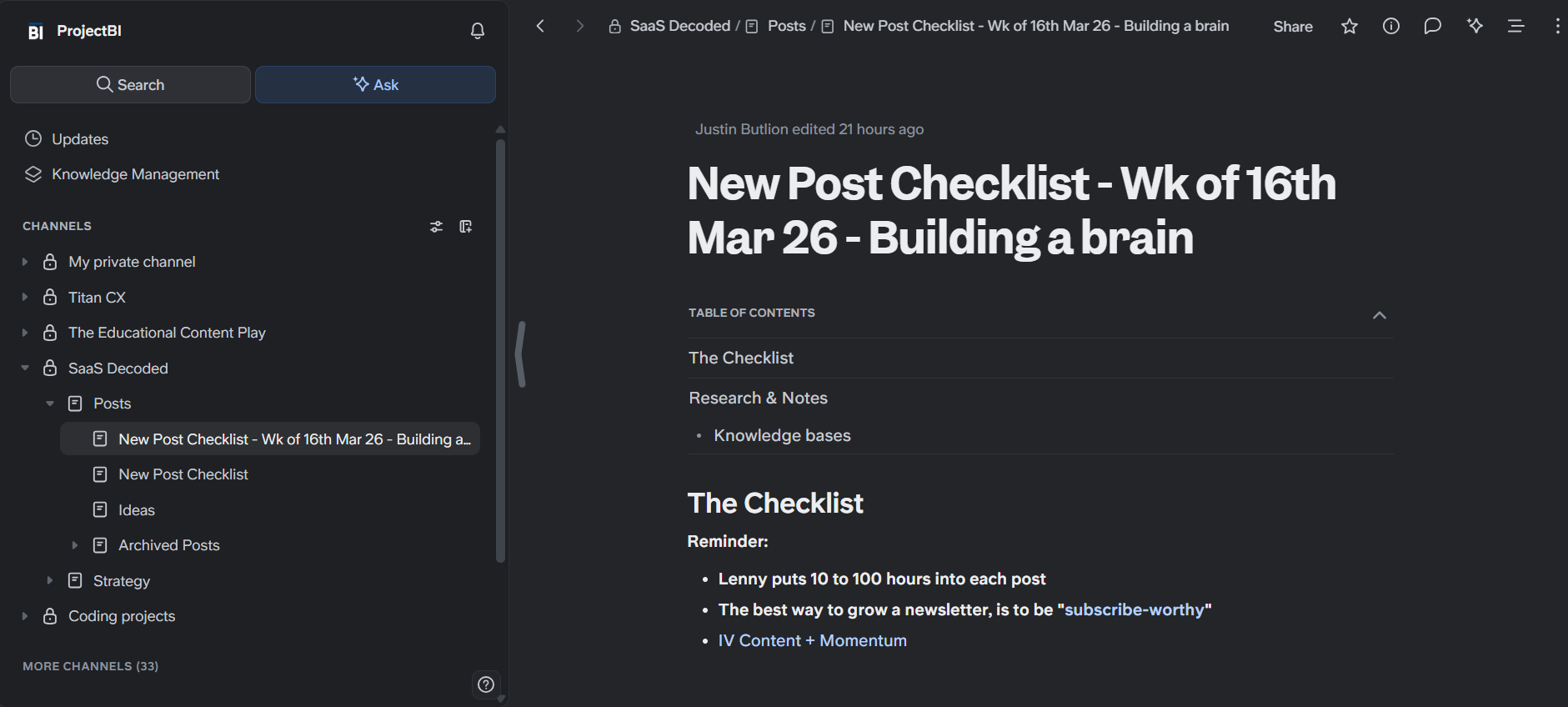
Slite is an internal knowledge base tool I’ve used for my online businesses the last few years.
At first glance you’ll notice a lot of similarities between Slite and Notion but you quickly see Slite’s value as being solely focused on helping online businesses store and retrieve their unique knowledge.
What makes Slite special is its intuitive approach and extremely low friction user experience.
Commenting, audit logs, extremely useful embed options, a smart folder structure, and public sharing of documents are just some of the great benefits the solution provides.
Confluence
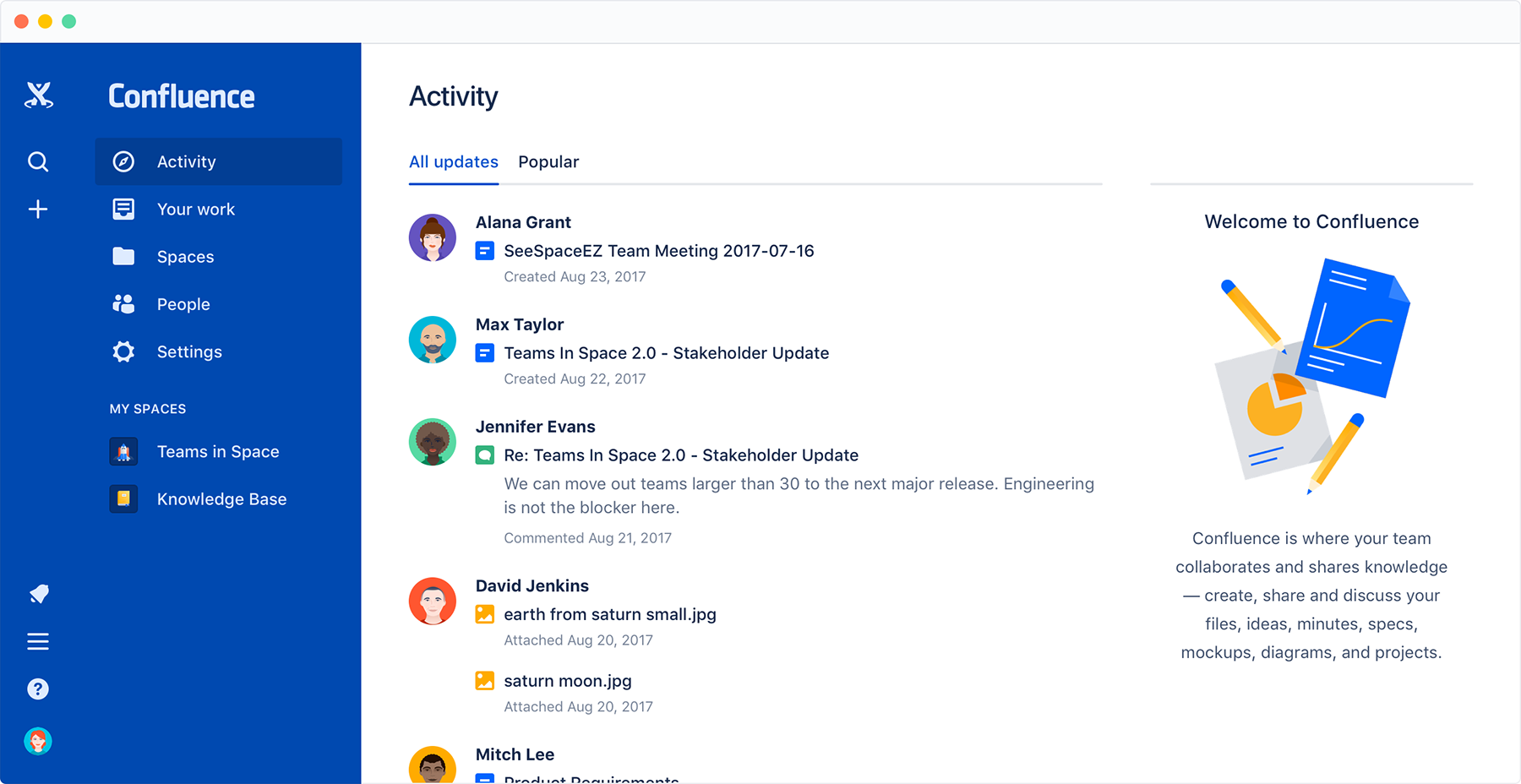
Confluence by Atlassian has been around for over 20 years. It launched back in 2004 as an internal wiki and team collaboration platform.
I used Confluence at my previous job about 10 years ago and back then it was a great solution, especially for creating product requirement documents (PRDs).
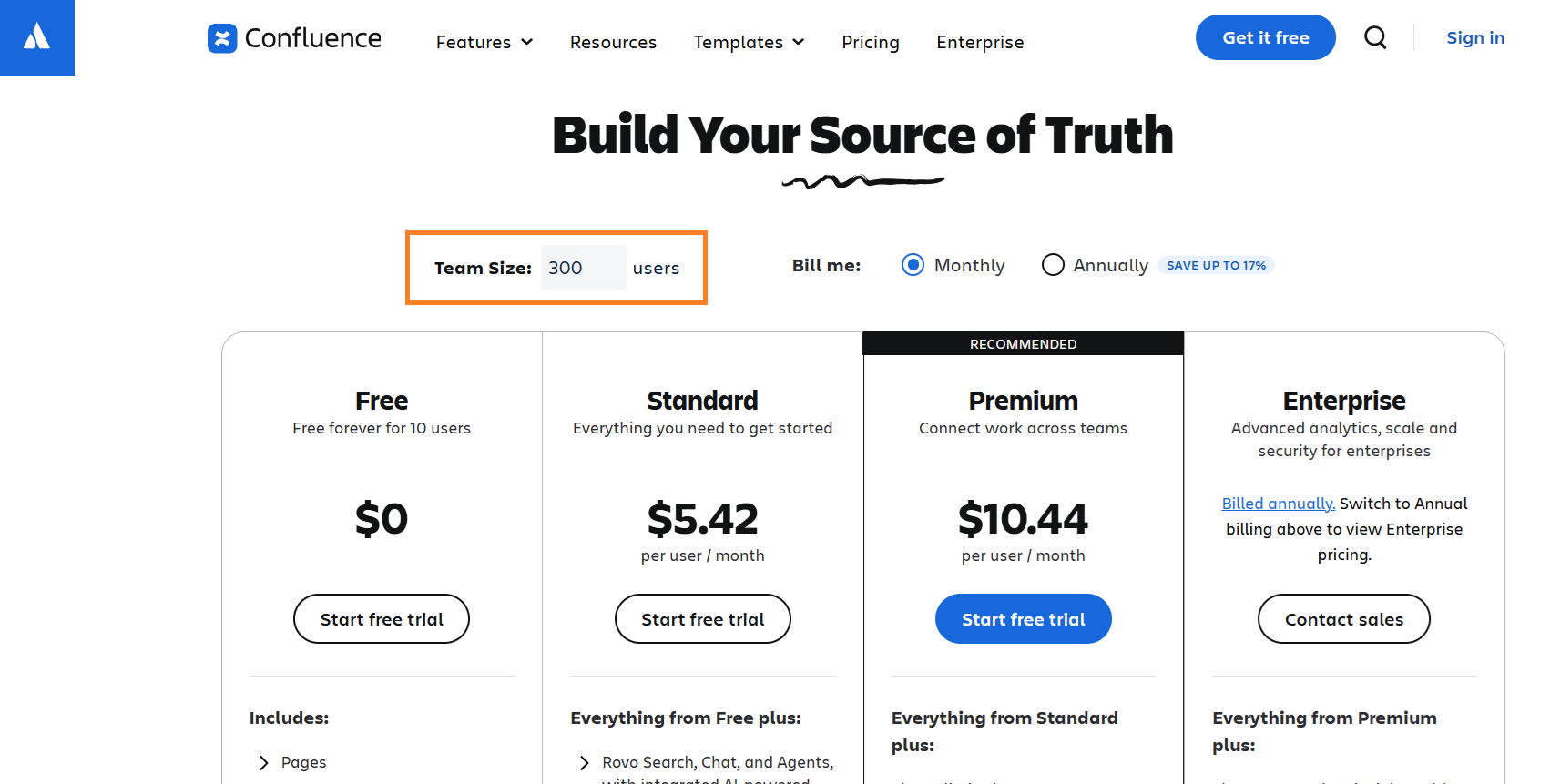
Confluence is a more enterprise focused (notice the team size option on their pricing page) knowledge base solution compared to Notion and Slite.
Jira is another product of Atlassian which is very popular among R&D teams; so if you’re already using Jira, you might want to take a closer look at Confluence and see if it is a good fit for your business.
Guru
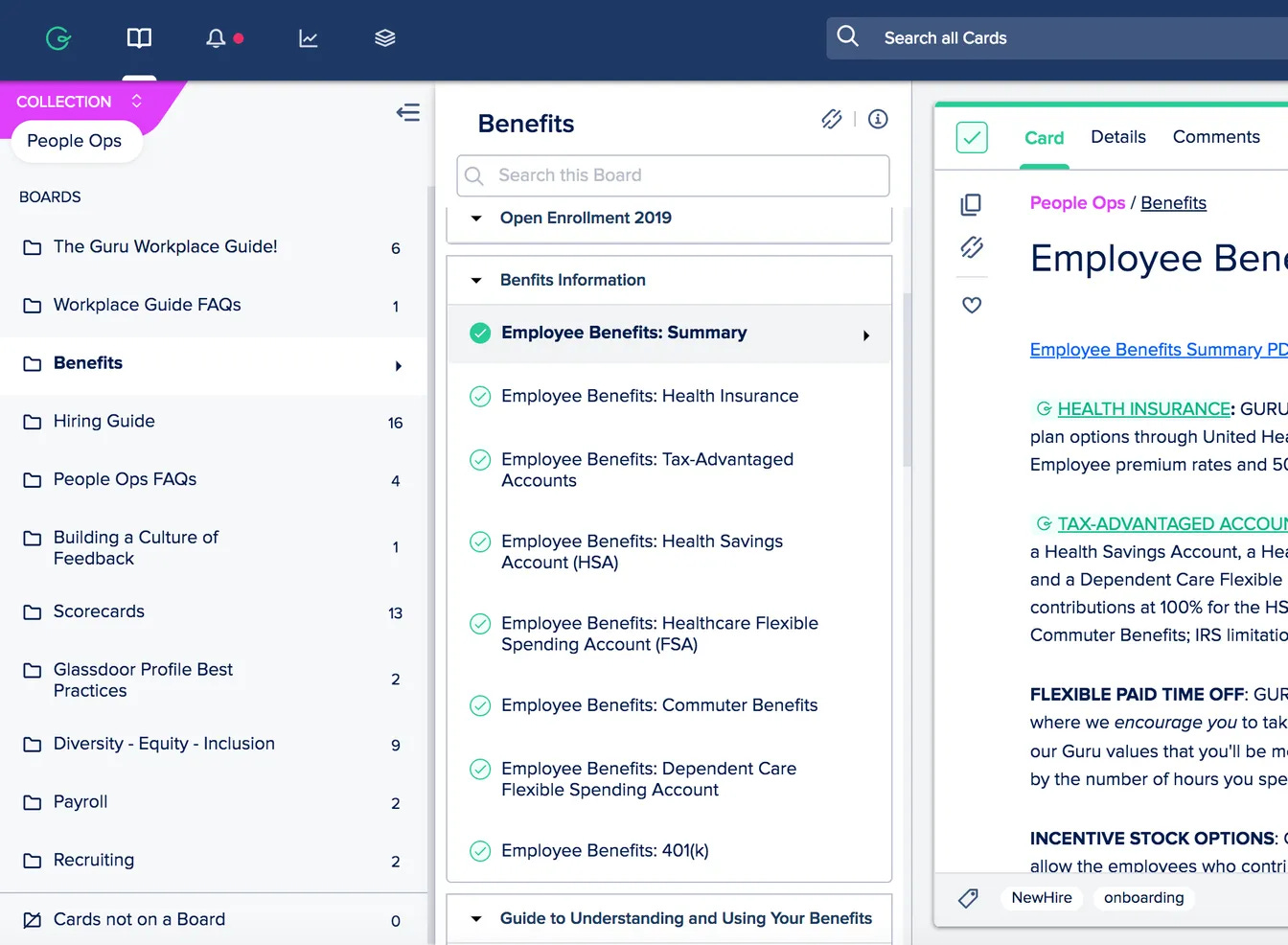
Out of 4 solutions I looked at for this post, Guru is the least known.
I remember being very impressed with Guru when I used it in my previous company since it had a very powerful chrome extension which made it easy to retrieve info from the knowledge base.
Since then Guru has moved up market becoming enterprise focused and positioning itself as a multi-product company. The company has leaned fully into AI.
At $30 per month per seat, Guru is also the most expensive of the 4 solutions on my list.
If you’re running a larger organization and doing an evaluation of the knowledge base market, then I’d suggest reaching out to Guru to request a demo.
The winner: Slite
Out of the 4 solutions I covered, Slite would be my knowledge base of choice for most online startups.
It’s affordability, ease of use, MCP server support, and focused approach check the boxes which I consider the most important when choosing a knowledge base.
For the remainder of this post I’m going to show you how to leverage Slite to achieve our end goal.
With that being said, the steps I’ll walk you through would also apply to any of the other knowledge base solutions I’ve covered.
What’s important is understanding the key concepts and use cases and then to apply them in whichever knowledge base you choose.
Step #2: Add your unique knowledge to your knowledge base
Every online business has different information that it should store in it’s “brain”.
A helpful rule that I’ve used for my own businesses is to save in the knowledge base any piece of information that you believe will need to be retrieved at least once in the next 12 months. When in doubt, add it.
This includes standard operating procedures, brand kits, tax returns, company specific info like tax ids, useful analyses, onboarding and offboarding checklists, user research, and the list goes on.
Organize everything by department and don’t be shy of using sub-folders.
Below are 15 examples of information that could go into your knowledge base.
Click on any of the items in the list below to find a useful template you can quickly add to your Slite account.
Tips for optimizing, scaling and managing your knowledge base
Assign a dedicated owner
In the early days this should be the CEO, but at scale it should fall under the COO. An ops manager should manage the day-to-day responsibilities.
Invite everyone to the knowledge base
The whole idea of a knowledge base is to centralize, organize and reduce the friction of retrieval of company-specific knowledge. Everyone in the company should have access to the knowledge base.
Slite, and the rest of the knowledge base tools I’ve covered, have adequate controls for limiting who can see what.
A knowledge base only works if it is maintained
Managers in the company should be responsible for maintaining their teams SOPs, checklists and other documents in the knowledge base.
Introduce company wide policies for conducting quarterly reviews of the documentation and make it clear to management that maintaining the knowledge base is expected and a requirement of their roles in the company.
Teach management exactly how to use the knowledge base
Whoever in the company is responsible for the knowledge base should conduct training sessions to teach management the “ins and outs” of the knowledge base. The deeper the training the better.
Use examples throughout the training and record the sessions. Save the records in the knowledge base.
Training videos can be shared to new employees as part of their onboarding.
Take advantage of the full capabilities of the knowledge base
Solutions like Slite have hundreds of minor features which provide incredible flexibility and power to users. Encourage team members to get to know the solution thoroughly and include useful examples in the training sessions.
Have a “rule book” for the knowledge base
The owner of the knowledge base should be responsible for maintaining a set of rules for how to use the knowledge base. This includes formatting, folder structure, what should and shouldn’t be added, how change requests should work, etc. The idea is to maintain consistency as much as possible and encourage order.
Step #3: Connect your knowledge base’s MCP server to your AI tools
Now that you’ve got your unique knowlege in one place, it’s time to connect your knowledge base to your AI tools so we can start building some workflows.
How to connect Slite’s MCP server to Viktor
The first connection we are going to set up is Slite’s MCP server to Viktor, a Slack-based agentic AI agent.
If you aren’t familiar with Viktor, check out my previous post below on how to add an AI agent to Slack. I go into detail on how Viktor works and how it compares to Runbear, another popular Slack-based AI agent.

If you don’t use Slack in your business, don’t worry, the use cases I’ll share later could still be set up using other AI tools that aren’t native to Slack.
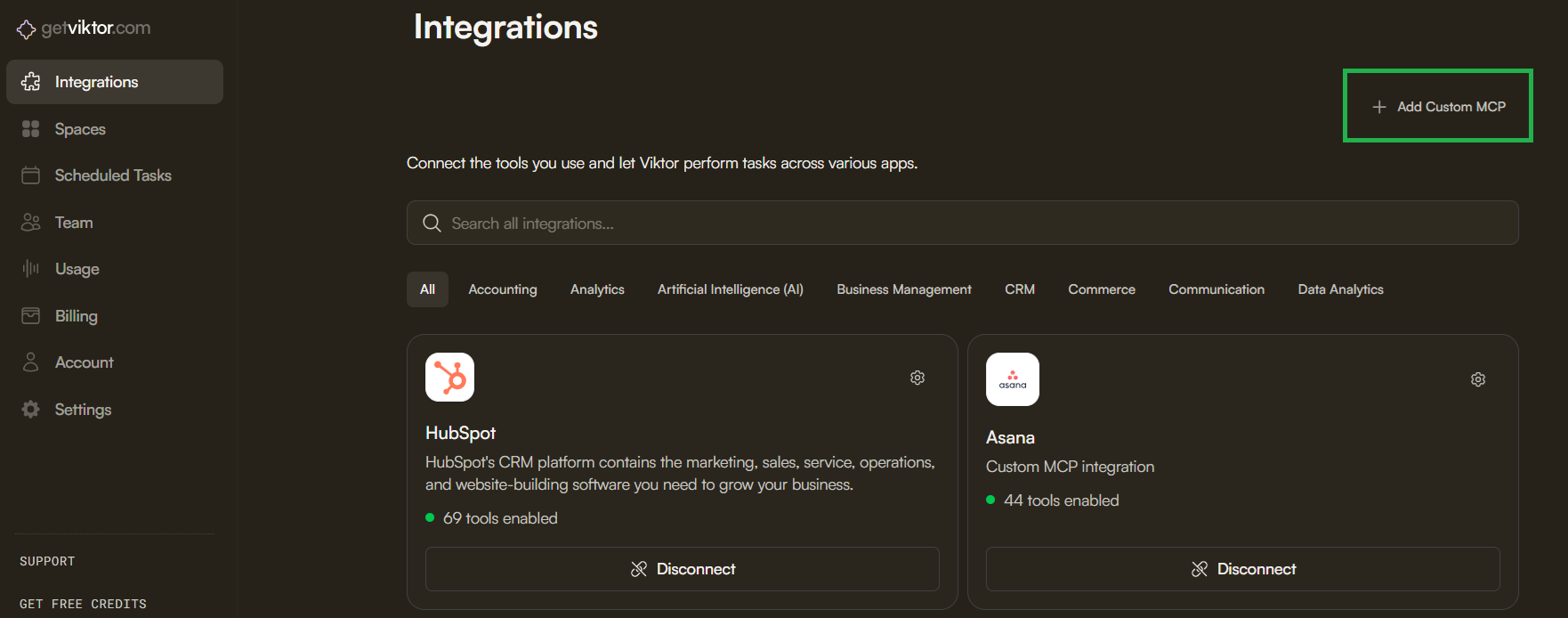
To connect Slite’s MCP server to Viktor, you first need to log into Viktor, click on “Integrations” in the left hand menu and then on “Add Custom MCP” in the top right corner.
In the popup that appears you’ll need to enter “https://api.slite.com/mcp” in the Server URL field.
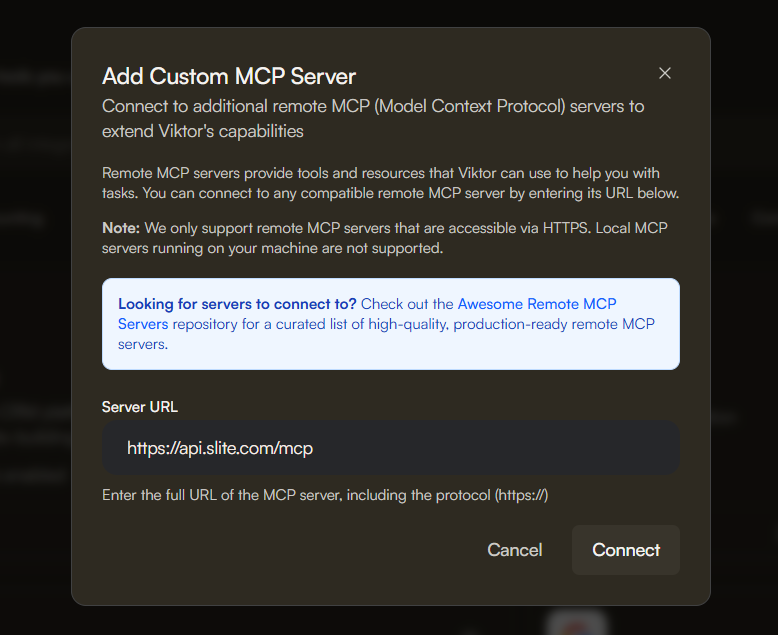
After clicking on “Connect”, you’ll need to log into Slite, pick your workspace and authenticate the connection. This takes a few clicks and less than 1 minute.
Once connected, you’ll see the custom MCP server listed in Viktor as a connected integration.
Congrats, you’ve now connected your knowledge base to an agentic AI agent.
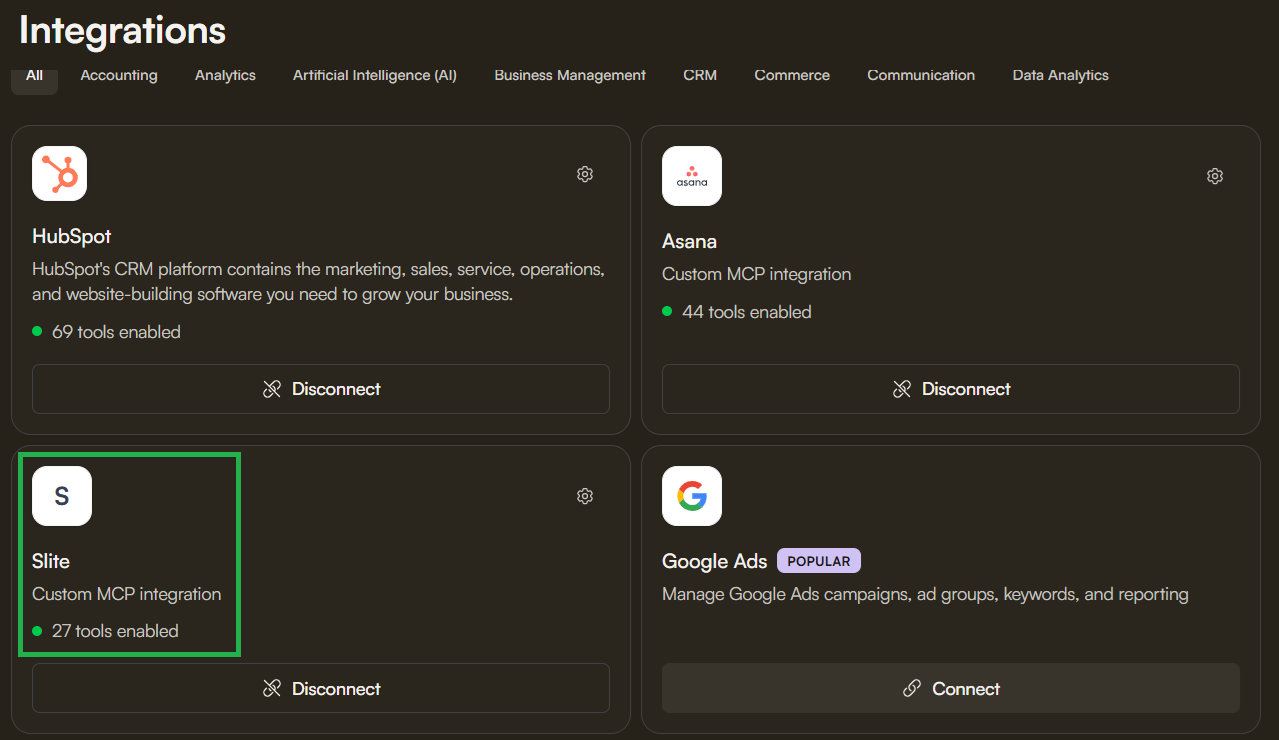
One thing that can be a bit confusing is that it’s possible to connect Viktor directly to Slite using a standard API integration via Viktor’s Pipedream partnership. I’ve tested this integration and I’d skip it. The MCP connection is far more powerful.
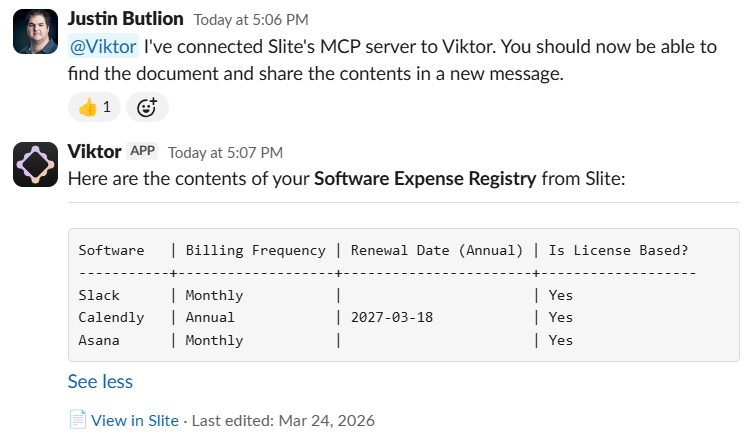
To confirm that the integration is working, you can ask Viktor to retrieve a document and share it in Slack.
How to connect Slite’s MCP server to n8n
If you’re not yet a fan of adding an agentic AI agent to Slack then you might want to consider n8n.
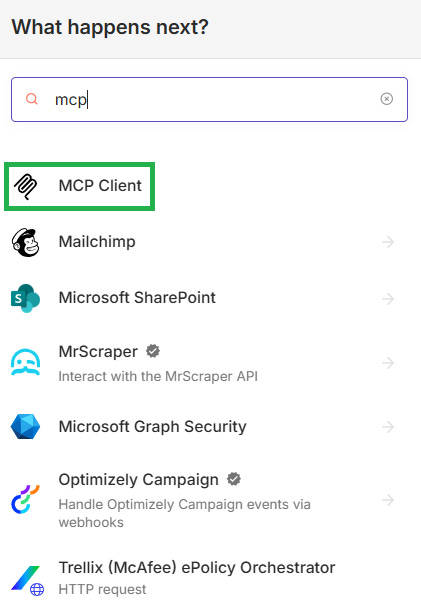
To connect Slite’s MCP server to n8n you’ll first need to add n8n’s MCP Client node to your workflow.
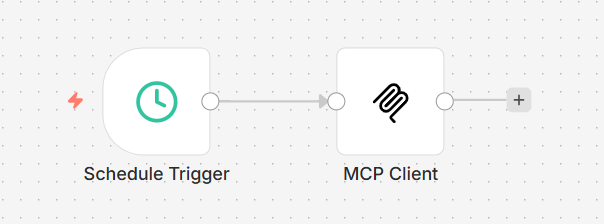
Once you’ve added the node to your workflow, you’ll need to add Slite’s MCP server details and authenticate, just like we did when setting up the connection with Viktor.
You’ll want to enter “https://api.slite.com/mcp” in the MCP Endpoint URL field and use MCP OAuth2 as the authentication method.
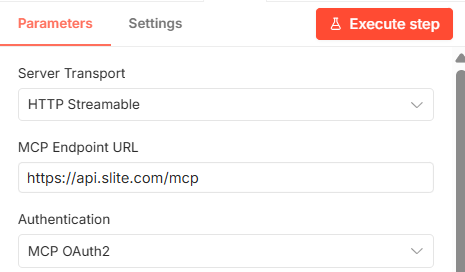
Next you’ll want to add “credentials” which is an easy process once you’ve followed the steps above. Click on “Create Credentials” and follow the steps.
Once you’ve successfully connected n8n to your Slite’s MCP server, you can go ahead and use the “search-notes” tool, run a search and confirm that n8n can access the MCP server.
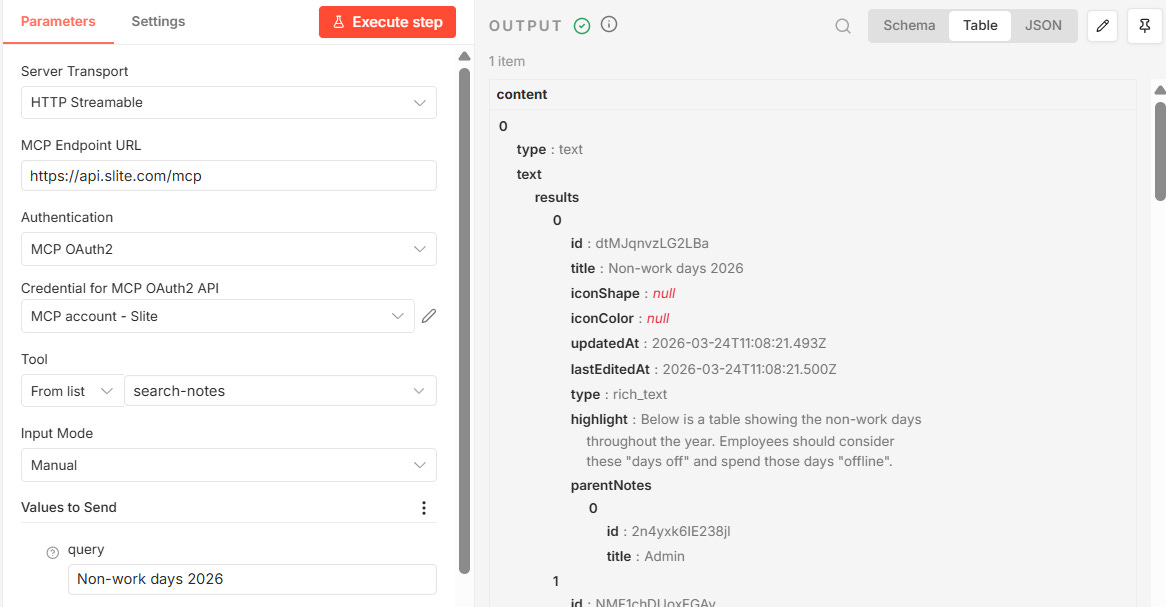
Take note in the screenshot above that I ran a search for “Non-work days 2026” which is the title of a document in my Slite. The result of the search appears on the right.
I can now use the id of the document that was returned in the search, and fetch the contents of that document using the “get-note” tool.
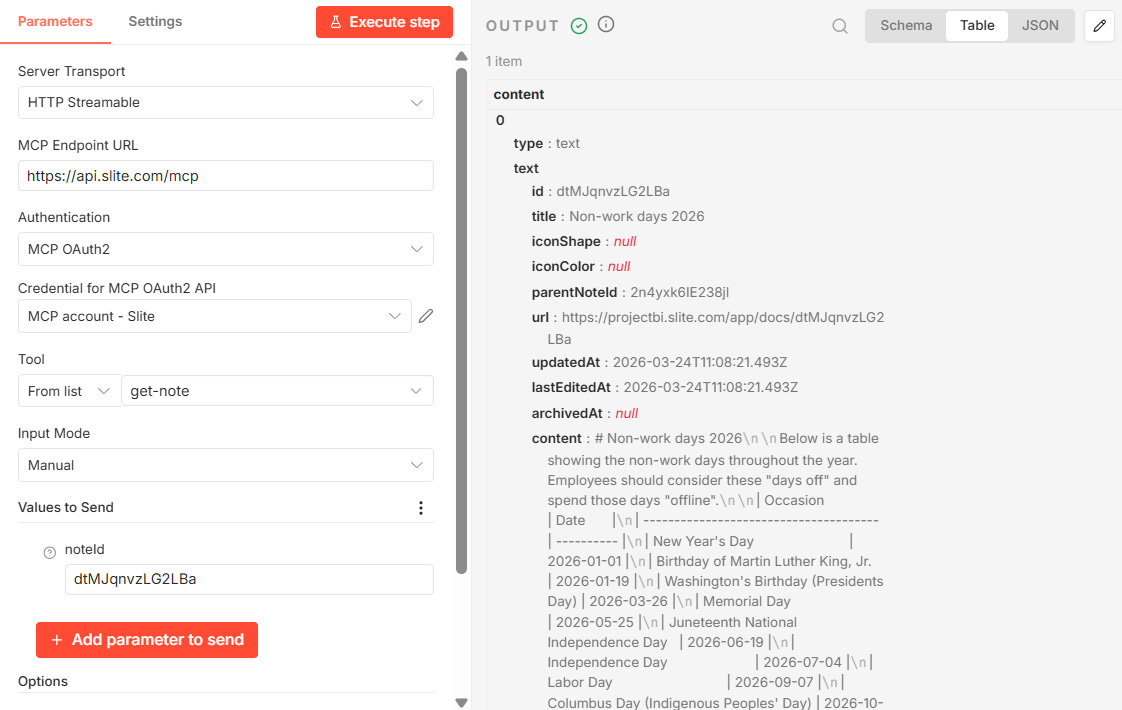
n8n is a powerful automation tool but it does require understanding how APIs work, data structures, logical progression and other technical concepts to really master.
If you’re new to n8n then I suggest watching the useful beginners guide below.
Step #4: Set up AI-driven workflows
So far we’ve laid the foundation, it’s now time to start using that foundation to help improve the business’s bottom line. It’s time to build some AI-driven workflows.
The following 6 workflows were all created using Slite and Viktor.
For each, I’ve included the exact prompts I used to trigger the workflows, and in some cases, turn them into recurring tasks for Viktor.
AI workflow #1: Software renewal weekly reminder
How often do you lose track of the software tools you pay for annually? It’s frustrating when a tool you stopped using gets renewed automatically and you have to chase down the company for a refund.
The first automation I want to teach you solves this issue by getting a weekly reminder of upcoming renewals shared directly with your CFO in Slack.
The first step in the process is to create a software expense registry in Slite.
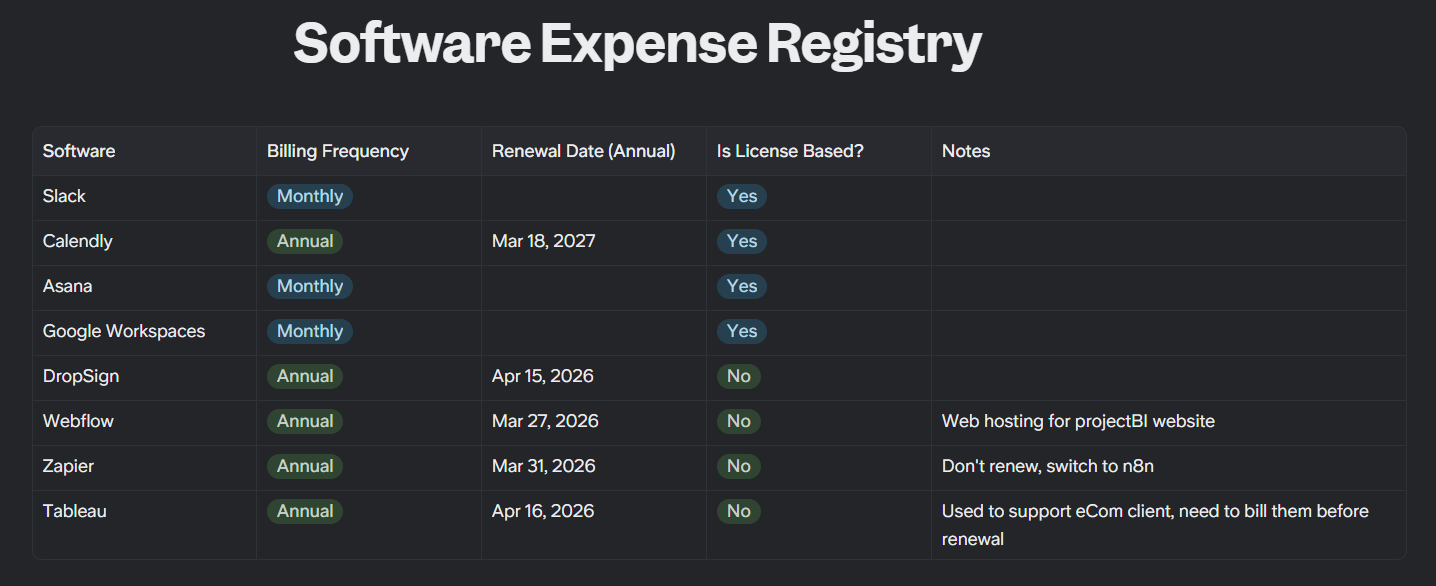
Create a dedicated document in Slite titled, “Software Expense Registry”, create a table and start filling in the details.
In my example, I used the following columns:
Software - The name of the software (text field type)
Billing Frequency - Either Monthly or Annual (single select field type)
Renewal Date (Annual) - The renewal date of the software. Only relevant for software which you pay for annually (date field type)
Is License Based? - Either “Yes” or “No” (single select field type)
Notes - Helpful additional info on the software (text field type)
This document should be maintained by your head of IT along with your bookkeeper / administrative assistant.
Once the document was in place, I sent Viktor the following message in Slack:
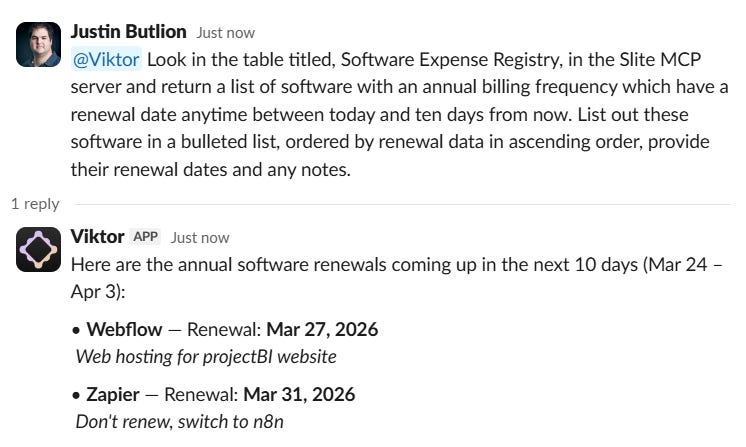
“@viktor Look in the table titled, Software Expense Registry, in the Slite MCP server and return a list of software with an annual billing frequency which have a renewal date anytime between today and ten days from now. List out these software in a bulleted list, ordered by renewal data in ascending order, provide their renewal dates and any notes.”

Below is Viktor’s reply.
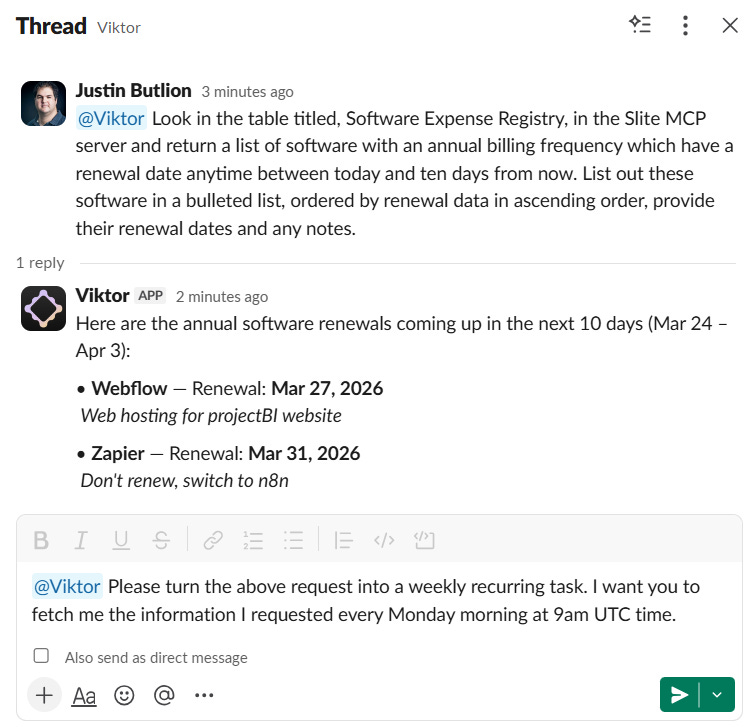
To turn this into a weekly task for Viktor, I sent the following:
“@Viktor Please turn the above request into a weekly recurring task. I want you to fetch me the information I requested every Monday morning at 9am UTC time.”
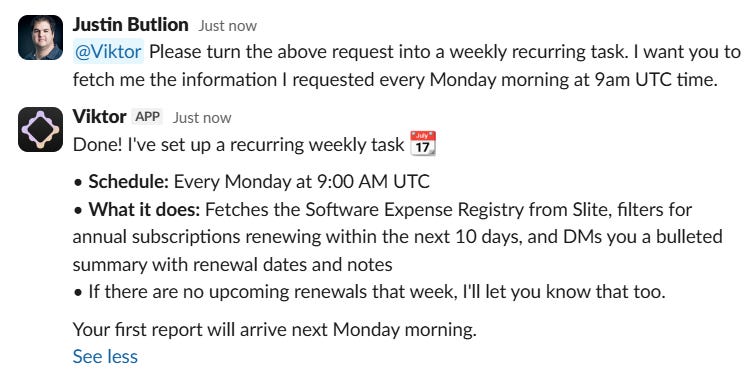
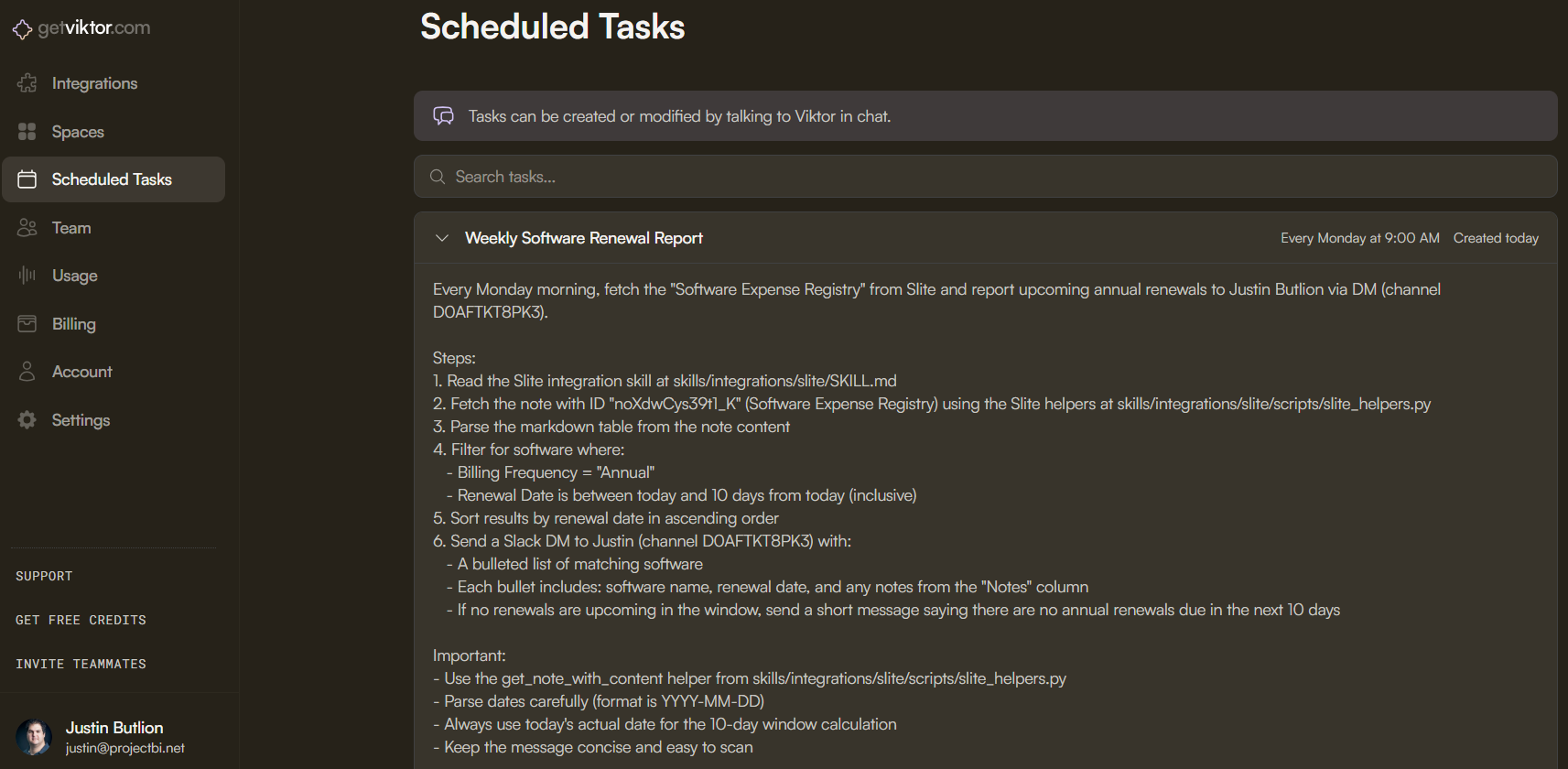
That was enough to set up the automation on Viktor’s backend.
AI workflow #2: New employee onboarding to-do list
When a new employee joins the business there are a lot of tasks that need to be checked off before the employee is ready to start working.
It can be helpful to share that list directly in Slack with the employee to help speed up the process.
The first step is to create a dedicated document in Slite with the onboarding to-do list for new employees.
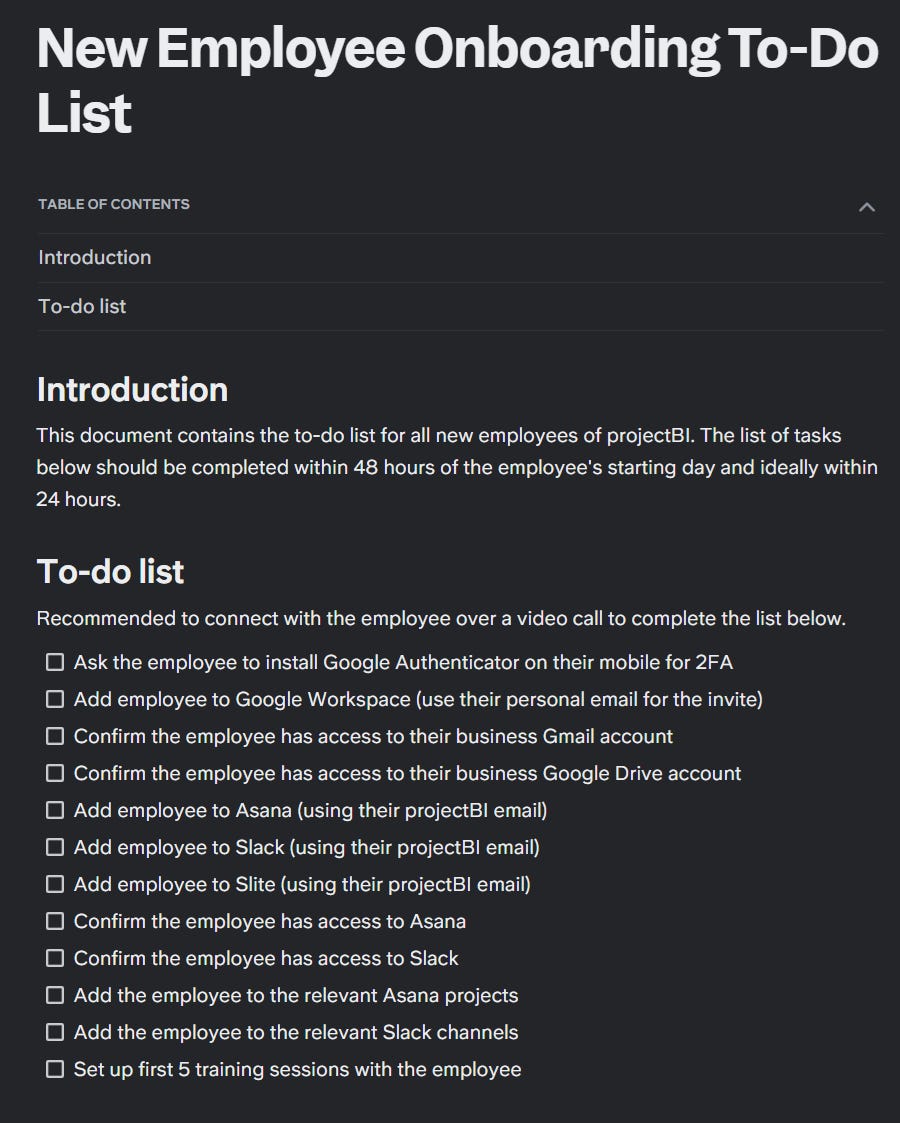
Below is the prompt I sent to Viktor in Slack:
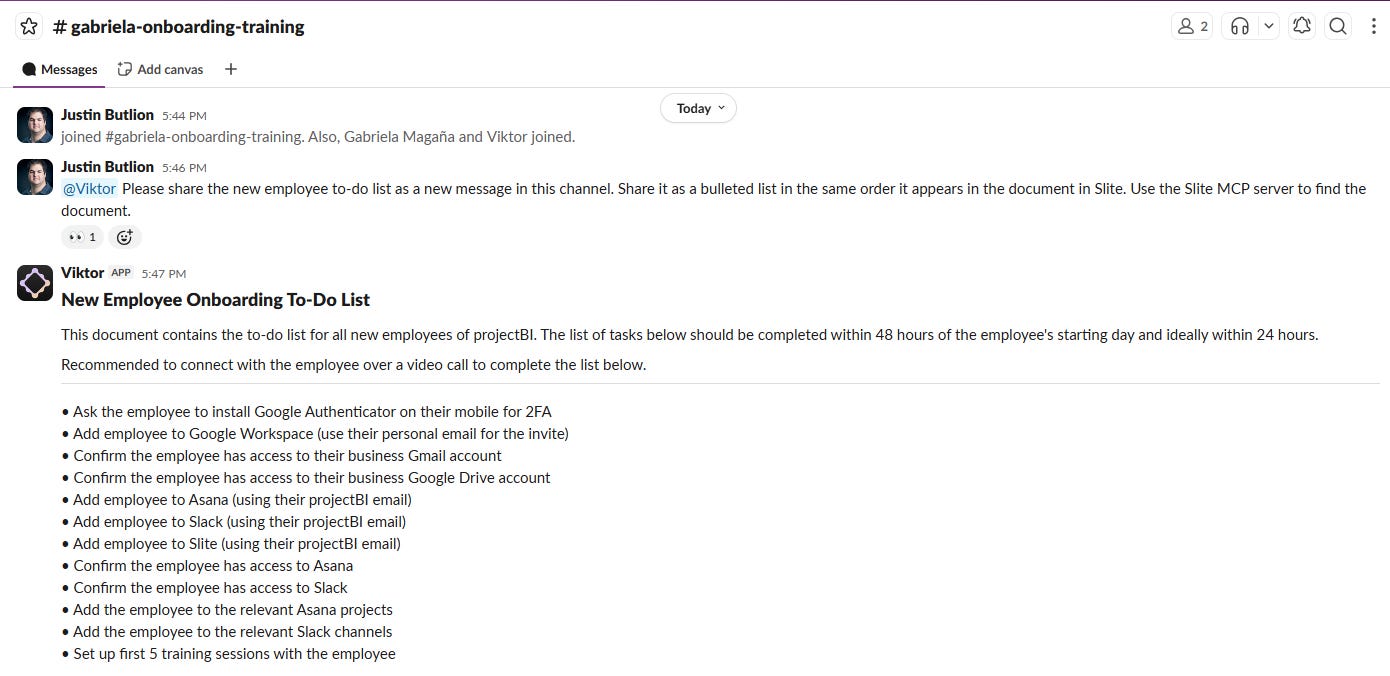
“@Viktor Please share the new employee to-do list as a new message in this channel. Share it as a bulleted list in the same order it appears in the document in Slite. Use the Slite MCP server to find the document.”

And below is the outcome of the message to Viktor.
AI workflow #3: Non-work days reminder
As more and more companies employ fully remote, global teams, not everyone in the company is always aware of all the non-work days scattered throughout the year.
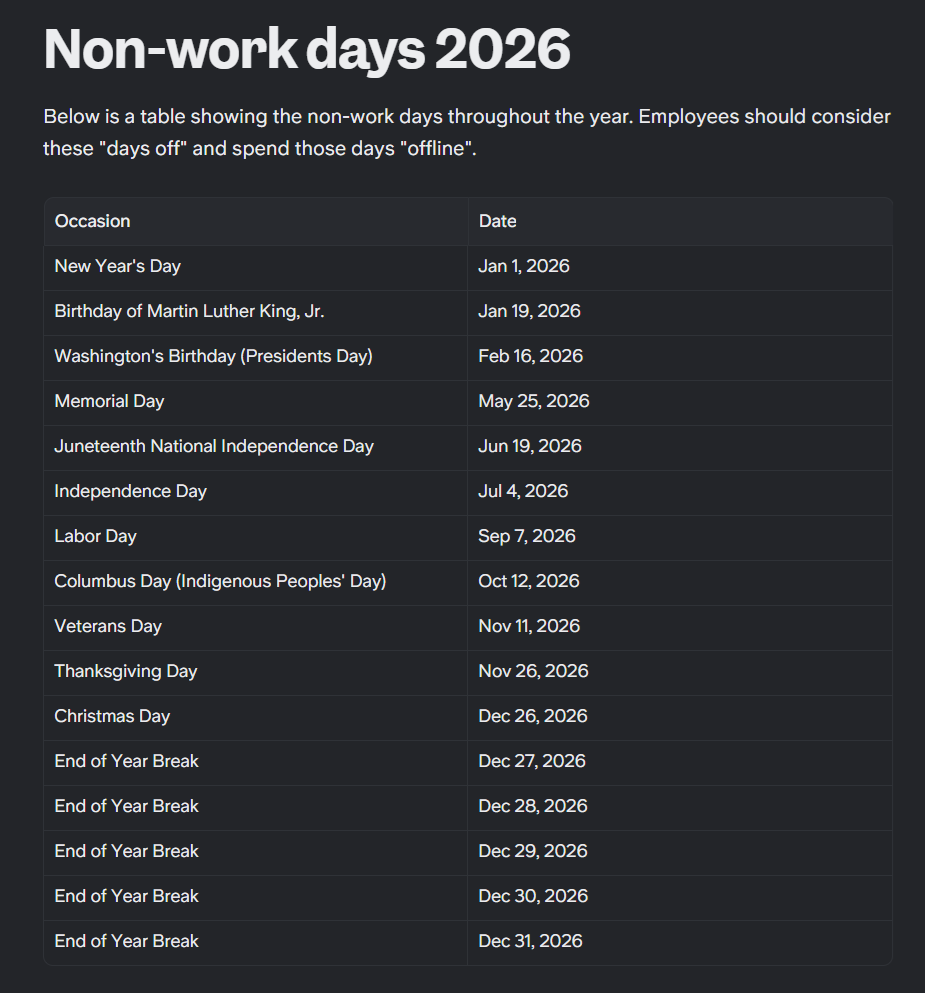
By creating a list of the non-work days in Slite, you can create a simple automation in Slack to let everyone know whenever there is an upcoming non-work day.
Below is the prompt I sent Viktor in Slack:
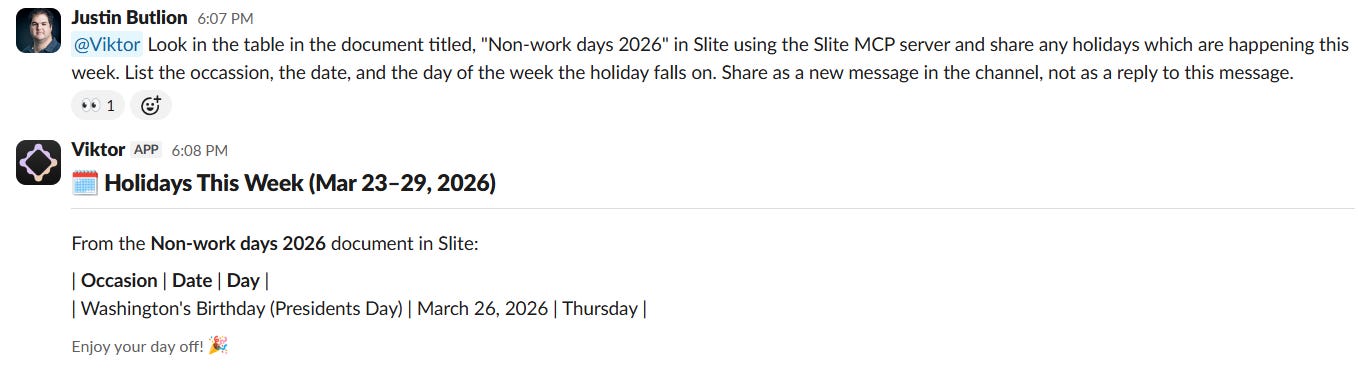
“@Viktor Look in the table in the document titled, “Non-work days 2026” in Slite using the Slite MCP server and share any holidays which are happening this week. List the occassion, the date, and the day of the week the holiday falls on. Share as a new message in the channel, not as a reply to this message.”
And below is what Viktor returned:
To turn this into a recurring task, I wrote the following to Viktor:
“@Viktor Turn the above request into a recurring weekly task. Run the request on Monday at 4:15AM UTC time. If there are no holidays listed in the table for the date range you checked, don’t send a message.”
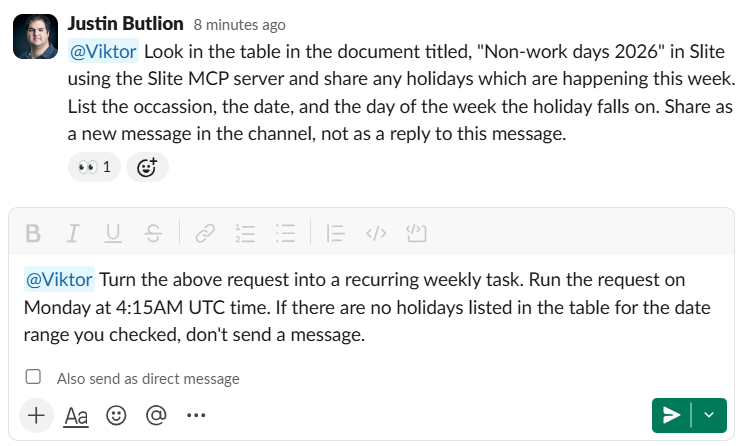
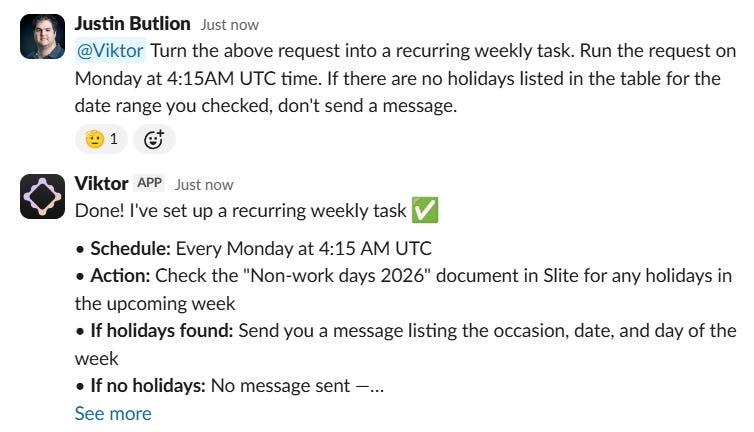
Once again, Viktor took my message in Slack and added a recurring task to the list of “scheduled tasks” in my account.
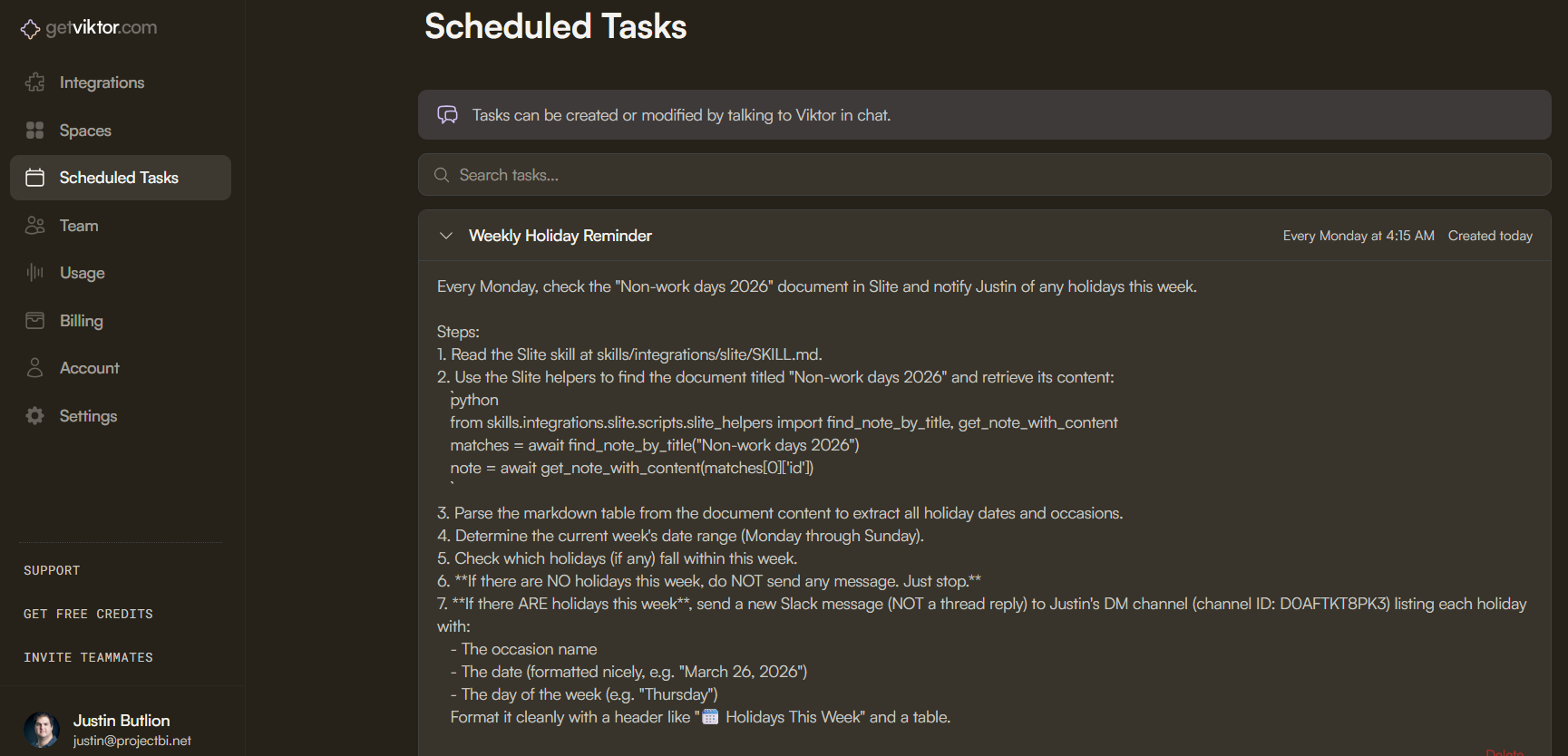
*I purposefully changed the date of President’s day in my table to show you how the task would be completed by Viktor.
AI workflow #4: Retrieve support FAQ responses
I own a number of SaaS products and get the occassional support ticket. I usually respond to each from scratch but this is far from optimal. I’ve decided to start using AI to help me provide better support, and to save me time.
To take advantage of this workflow you first need to create a FAQ document in Slite which addresses your most common support questions.
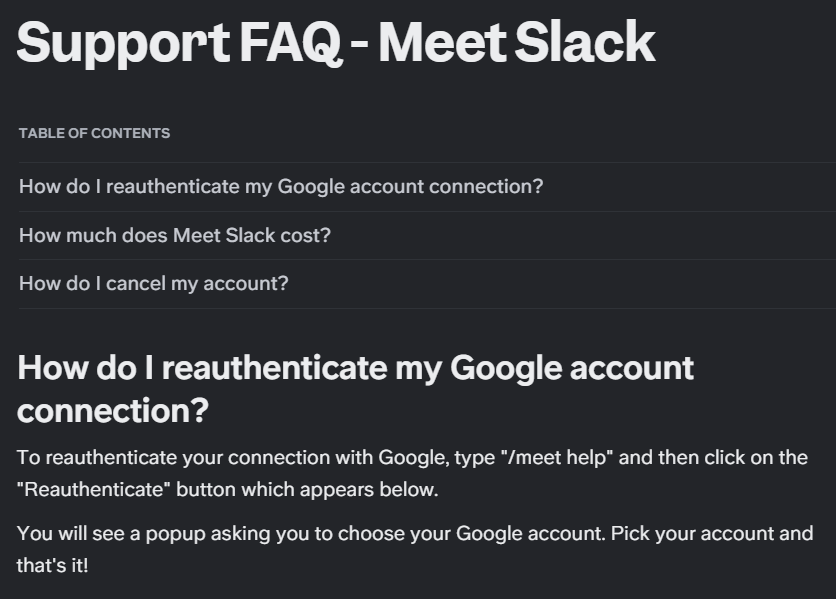
Once the document is in place, you can use Viktor to pull relevant info from the knowledge base and draft responses.
“@Viktor Below is an email I got from a user of Meet Slack:
"Hi, I need help authenticating my Google account"
Check the support FAQ document for Meet Slack in Slite's MCP server, find the relevant answer to the question above and draft a response I can send the user. The user's name is John.”
And Viktor’s reply:
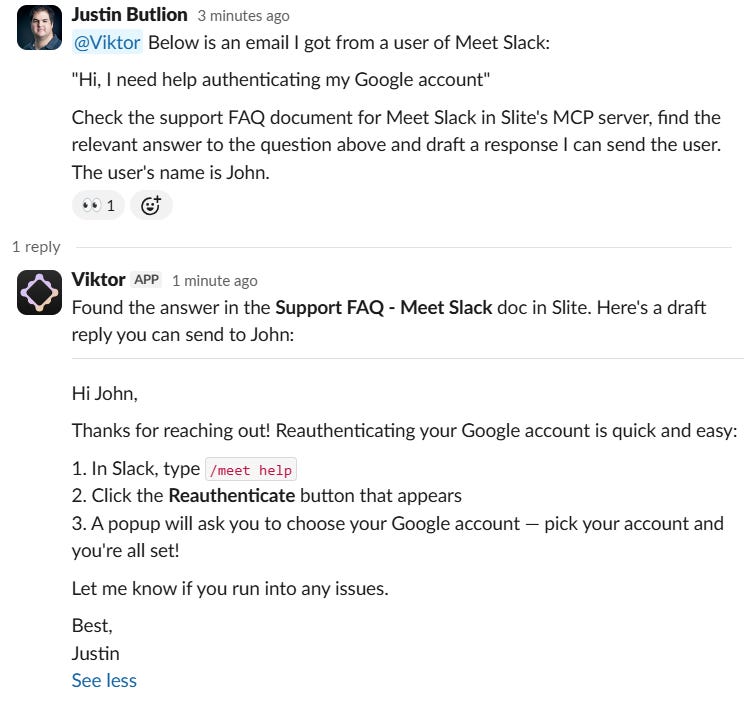
Viktor did a fantastic job and I can now just copy the response and send it.
In the future I want to take this flow even further by simply adding a label to the email and have Viktor create a response directly in Gmail as a draft.
AI workflow #5: Share summary of bank statements to better understand financials
One of the most powerful things AI agents can do is view pdfs and other file types via the MCP server.
In this workflow I’m going to show you a powerful use case where we can use Viktor to analyze financial documents straight from our knowledge base.
The first step is to have a place in Slite where exported pdfs from your bank are saved.
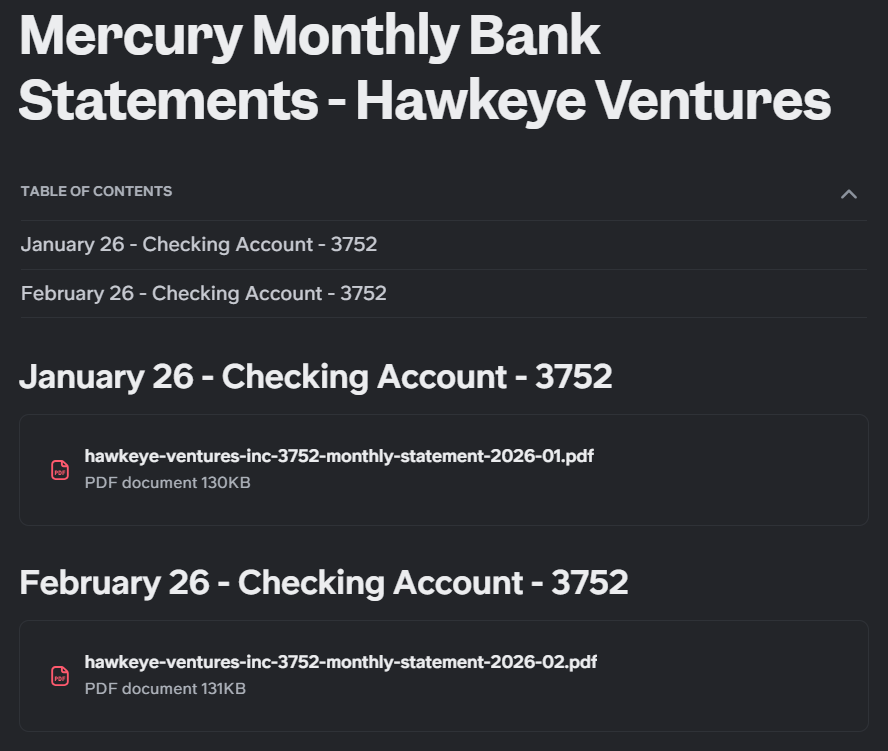
Slite allows you to add files to documents and you can use headers and the useful “table of contents” block to keep things organized.
In the example above, I’ve saved two exported pdfs from my online bank, Mercury, for one of my checking accounts for Hawkeye Venture, my software holding business.
Believe it or not, Viktor, our Slack agent can access these pdfs directly via Slite’s MCP server.
This is what I wrote to Viktor to see if it could analyze the pdfs:
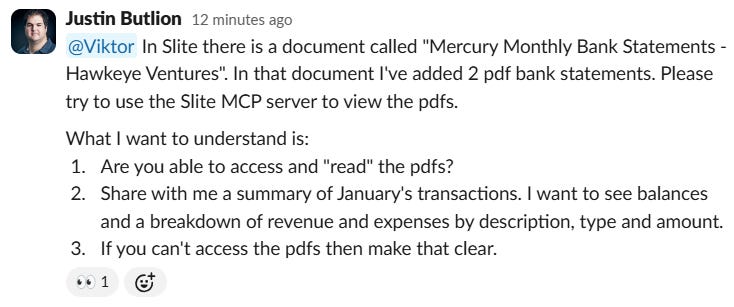
Below is Viktor’s response.
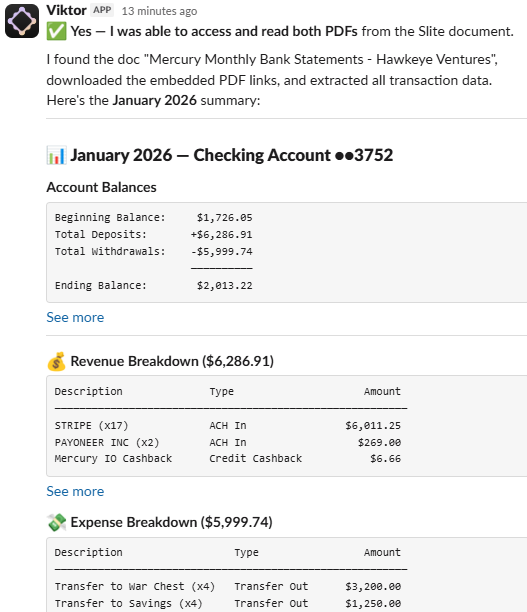
Just incredible! I went over all the numbers and Viktor was spot on!
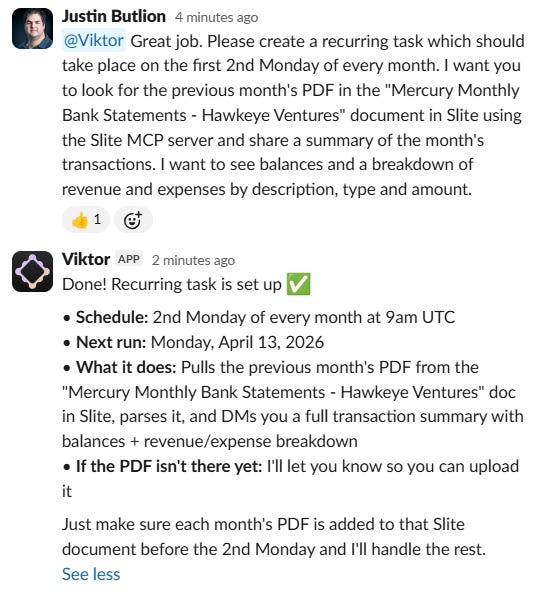
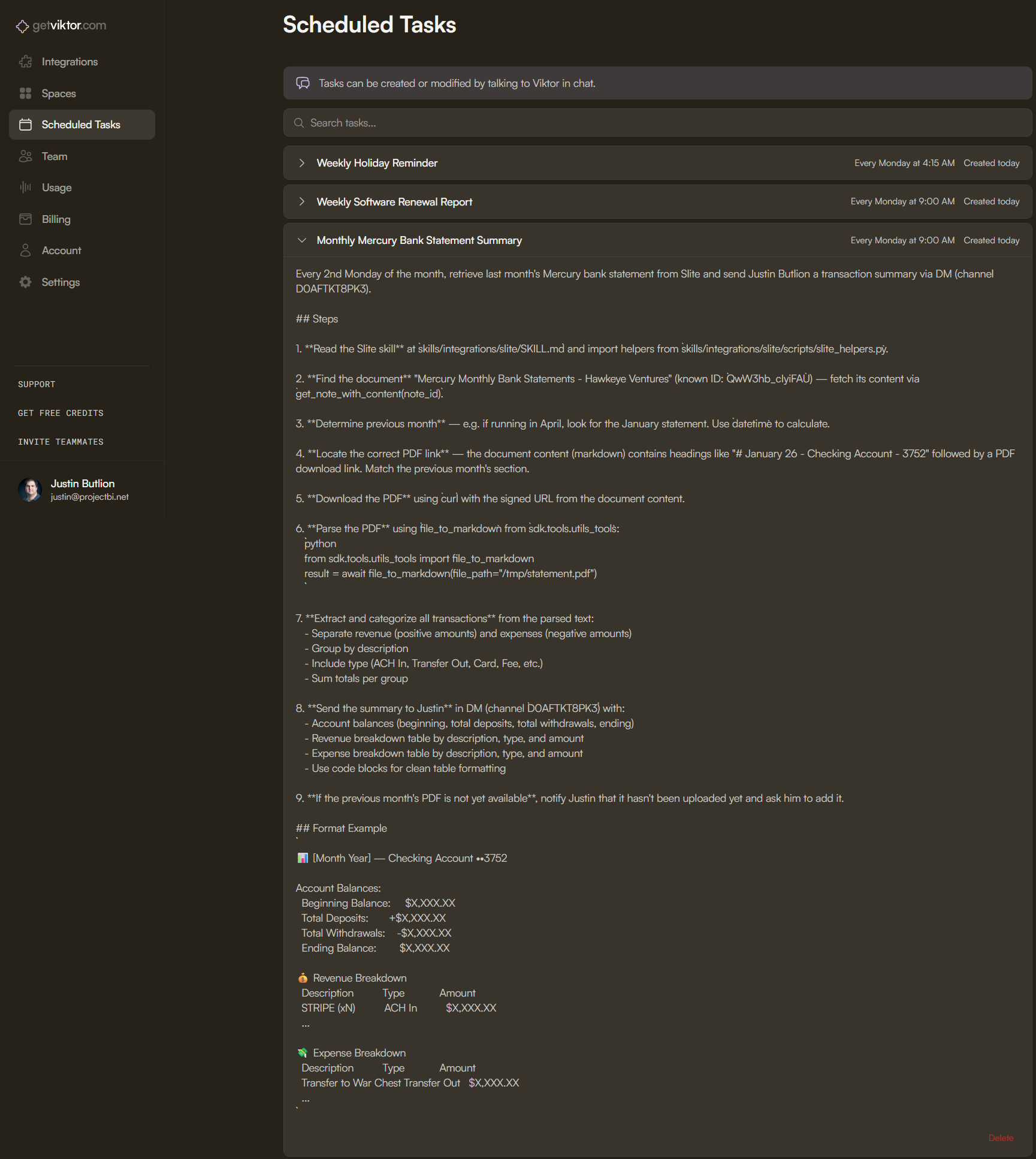
To turn this into a recurring task for Viktor, I sent it the following:
“@Viktor Great job. Please create a recurring task which should take place on the 2nd Monday of every month. I want you to look for the previous month’s PDF in the “Mercury Monthly Bank Statements - Hawkeye Ventures” document in Slite using the Slite MCP server and share a summary of the month’s transactions. I want to see balances and a breakdown of revenue and expenses by description, type and amount.”
AI workflow #6: Build a content digest and stay on top of industry news
Most industries have a handful of websites where the most relevant news is made public.
You can use Viktor and your knowledge base to build a repository of relevant articles and then turn it into a content digest to help stay on top of industry news.
The first step to build this workflow is to create a document in Slite which can act as your “database”.
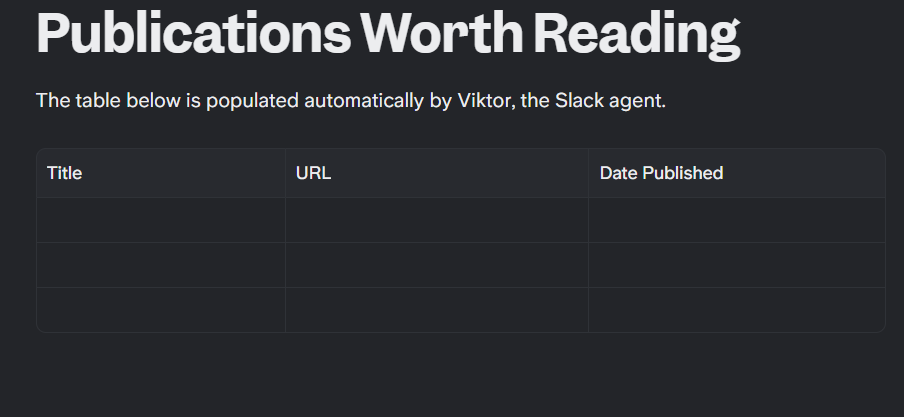
Next I asked Viktor to visit the RSS feed of one of the websites which are relevant to my industry, Techcrunch, and add the contents of the RSS feed to the table.
I did this to see if Viktor could visit the RSS feed, pull the relevant contents and add them to the table. If it can do all that with a single prompt, the rest of the flow will be easy.
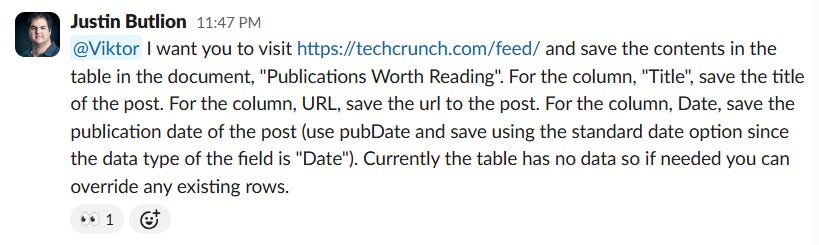
I could have improved the prompt above by mentioning that the document was in Slite but Viktor was smart enough to work that part out itself.
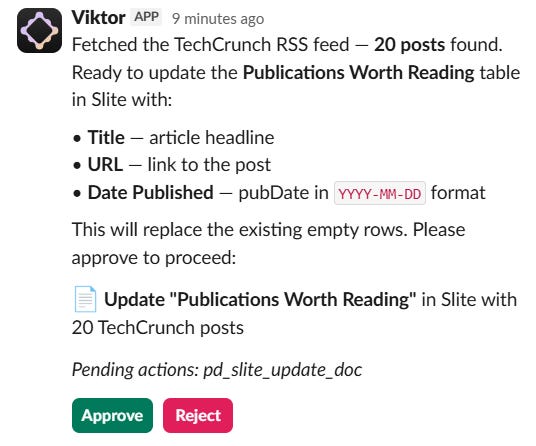
Viktor got the details and was ready to add them to the table but it first needed approval since the request was to update a Slite document which is a riskier request.
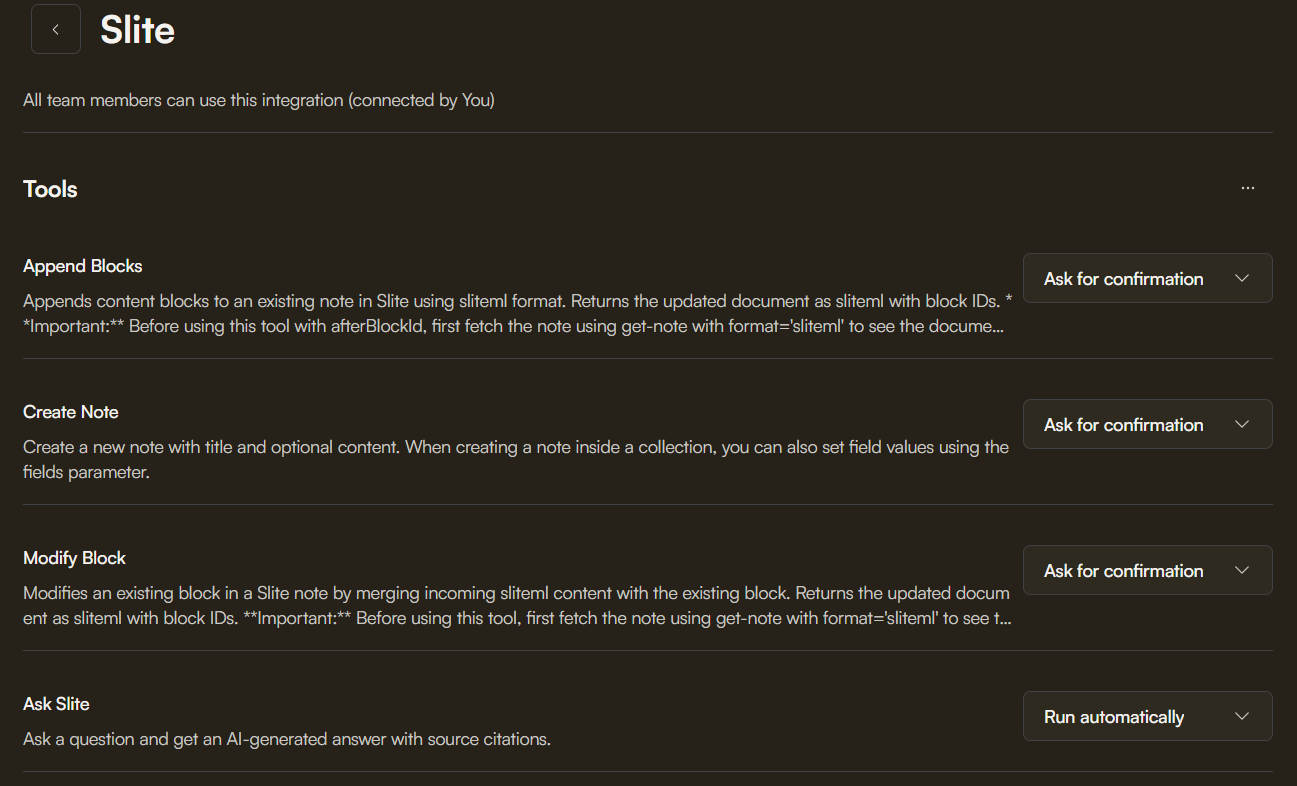
You can change which actions require approval for each integration in your Viktor account.
After providing Viktor with approval and waiting a few seconds, it let me know the task was complete.

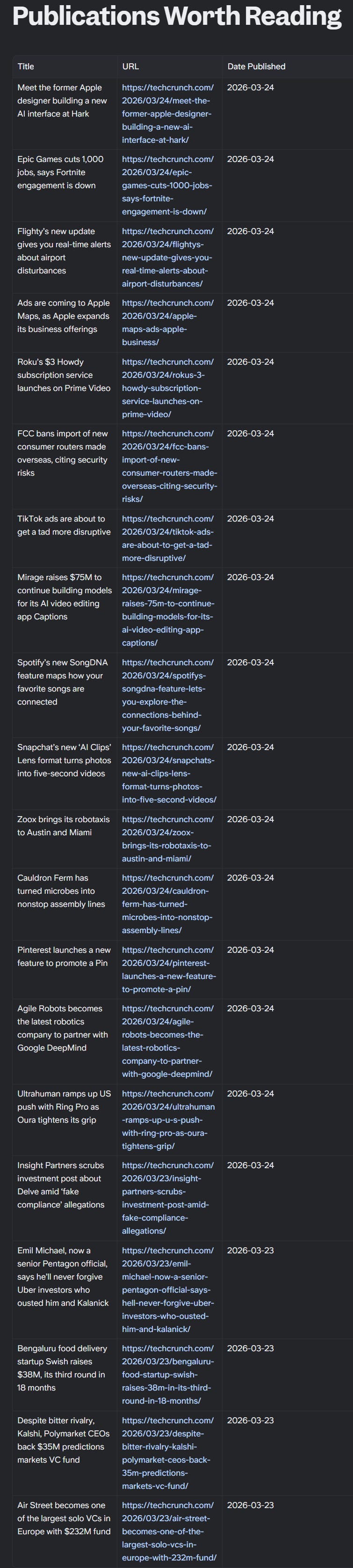
I now knew that Viktor could achieve what I wanted so I could now optimize the prompt.
“@Viktor Good job. I want you to visit https://techcrunch.com/feed/ once a day at midnight UTC time and record the contents in the “Publications Worth Reading” document in Slite.”
You could include multiple RSS feeds in the prompt above to expand your data collection.
Since Techcrunch publishes more than 20 articles a day (their RSS feed is limited to the most recent 20 posts), this flow wouldn’t capture every publication so you might want Viktor to run the check more frequently (will be more expensive), or to add more filters so Viktor isn’t saving every post in the table.
At this point we are automatically seeding our database but we aren’t done yet. We need Viktor to summarize the most recent publications in our database.
“@Viktor Visit the document, "Publications Worth Reading", in Slite and share a summary of the most recent publications listed in the table in the document. Most recent means posts which were published in the last 7 days. Limit the summary of each publication to 5 sentences or less.”
Viktor didn’t disappoint.
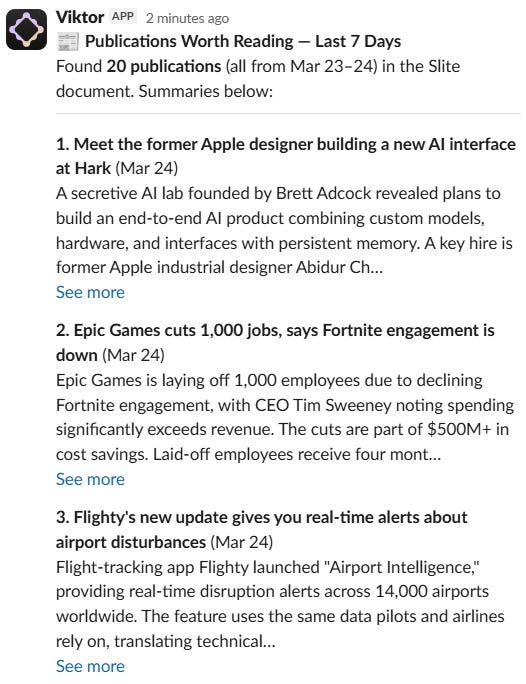
Make sure you are very clear in your prompt so Viktor doesn’t end up summarizing the entire database which would cost you a lot of credits.
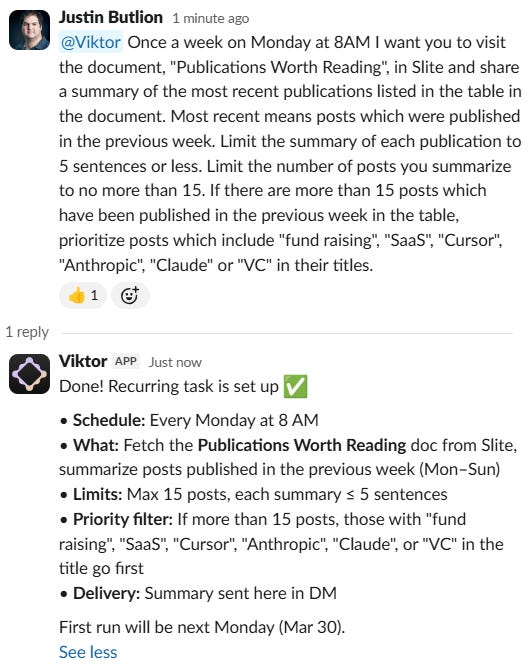
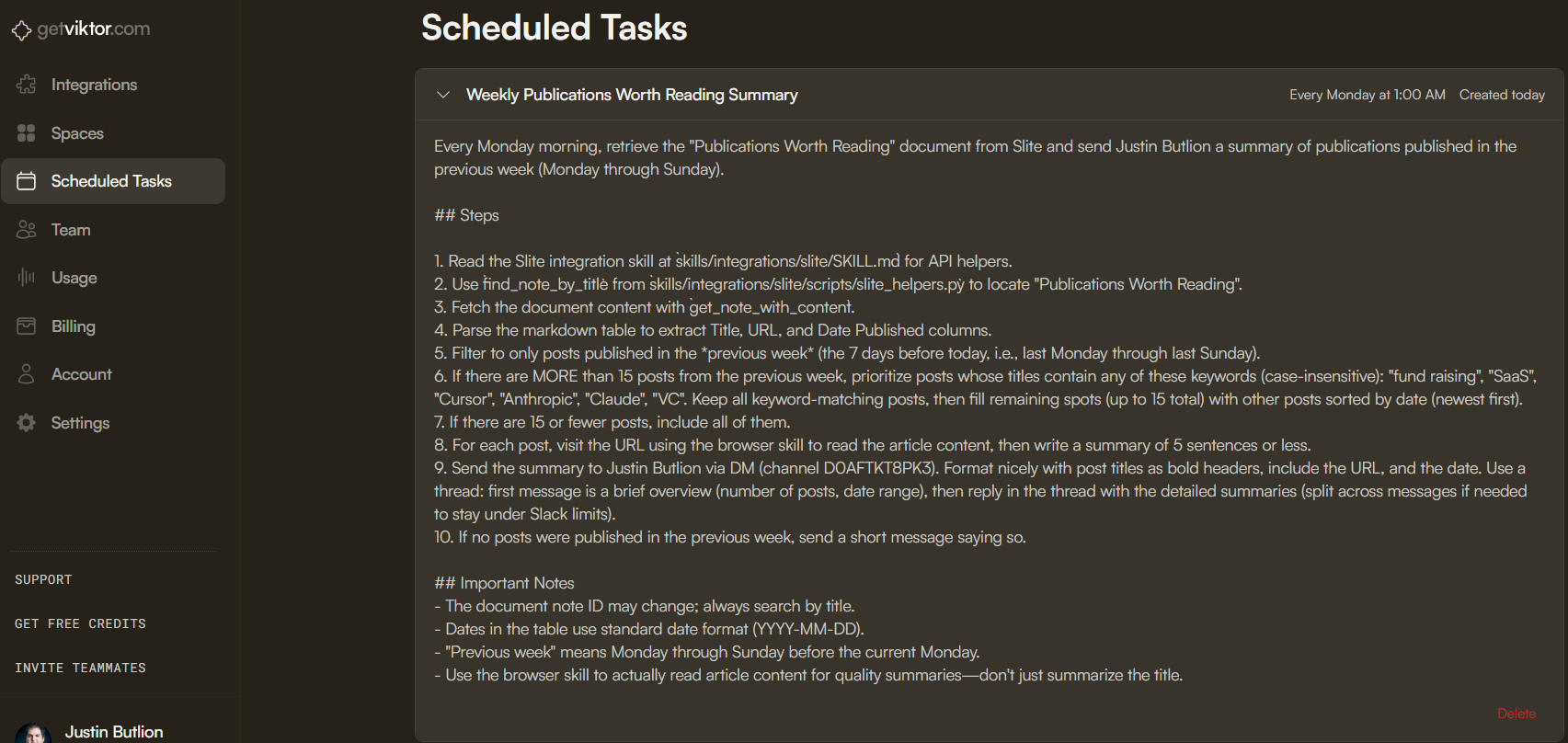
The last step in the process is to turn the request into a recurring task.
“@Viktor Once a week on Monday at 8AM I want you to visit the document, “Publications Worth Reading”, in Slite and share a summary of the most recent publications listed in the table in the document. Most recent means posts which were published in the previous week. Limit the summary of each publication to 5 sentences or less. Limit the number of posts you summarize to no more than 15. If there are more than 15 posts which have been published in the previous week in the table, prioritize posts which include “fund raising”, “SaaS”, “Cursor”, “Anthropic”, “Claude” or “VC” in their titles.”
Final words
If you got this far, pat yourself on the back.
You’ve built a “brain” for your company and learnt how to use your unique knowledge to run powerful AI workflows.
You now have the skills to continue to scale your knowledge base and AI tools to add more and more value to your company.
I’ve done my job and it’s now your turn.
I want you to share with me below in the comments section one example of an AI workflow you’ve built that leverages your knowledge base.
Thanks for reading and if you liked this post, please go ahead and hit the share button below so others can find my content.
Justin
*This post includes affiliate links for both Viktor and Slite. I’m a fan of both of these solutions and use them regularly to support SaaS Decoded. I pick the tools I partner with very seriously. If you decide to signup and pay for either Viktor or Slite, I’ll get a small cut of the money you spend in your first 12 months.