

Hey friends,
I’ve been spending a lot of time on Project Echo lately as I try to build some positive momentum.
As I reported in part 6 of the $0 to $10k series, signups have dried up completely and I’ve felt quite stuck. I was honestly close to throwing in the towel.
While feeling especially low, I wrote an X post sharing my feelings.

This post got a bunch of replies by some experienced and highly successful indie developers and the feedback was very helpful.
The general theme of the feedback was that my messaging wasn’t good enough and there were too many red flags that were putting people off.
I took the feedback seriously and took a day or two to think it through.
Project Echo’s new positioning and refined ICP
I realized that going with the positioning of collecting, managing, organizing and sharing user feedback was quite weak. I also realized that my ideal customer profile (ICP) wasn’t clear enough.
The website looked outdated, “cheap”, and I hadn’t updated the open page in a while.
I needed to rethink my strategy and get clearer on Project Echo’s mission, unique selling proposition (USP), and messaging.
While this was going on I also managed, for the very first time, to get a Project Echo user fully integrated with the platform.
This was an amazing feeling since the user now fully understands the platform and is using it almost daily since getting set up.
The combination of getting this user fully integrated, discussions I had with a few indie developers, and a lot of thinking led me to come up with a new positioning for Project Echo.
Project Echo’s refined ICP is independent developers (indie developers and vibe-coders) who build with AI and want to integrate user feedback in their development process.
These individuals move quickly and need a tool which integrates into their existing process without adding friction.
Previously I expected users to spend time within Project Echo utilizing the roadmap, changelog and other features, but this isn’t appealing to most developers. Most don’t have a product roadmap and changelog, and aren’t interested in adding extra tasks to their busy week.
What most developers don’t have is a clear process for collecting user feedback, getting input from their users on feature requests, and for closing the loop.
This is the first big value add of Project Echo; the platform integrates with your SaaS and gives you the feedback portal which is used for collecting feedback. Users can vote for the requests they back, and share their thoughts as comments.
The next big piece of the puzzle is allowing users to pull all the useful information in their Project Echo workspace into their development process. Project Echo’s API and MCP now allow users to do just that.
The process has now changed from: Collect —> Organize —> Optimize —> Share —> Close the loop to,
Collect —> Prioritize —> Build —> Close the loop —> Share
The new and improved homepage
Now that I had my new and improved positioning, it was time to work on a new homepage and better messaging.

Along with a new headline and sub-headline, I also managed to implement the style guide for the Project Echo brand that I got a professional designer to create for me years ago.
I gave the style guide pdf to my design agent in Grok Bot and asked it to turn it into a design system I could share with my Cursor coding agent.
The change in the quality of the design of the site is remarkable. The colors, font’s, text sizing, etc is a massive improvement over the previous version.
Each day last week I spent some time tweaking the site. This lead to an improved footer section, the addition of the request page image above the fold (to show off the admin area), and other improvements.
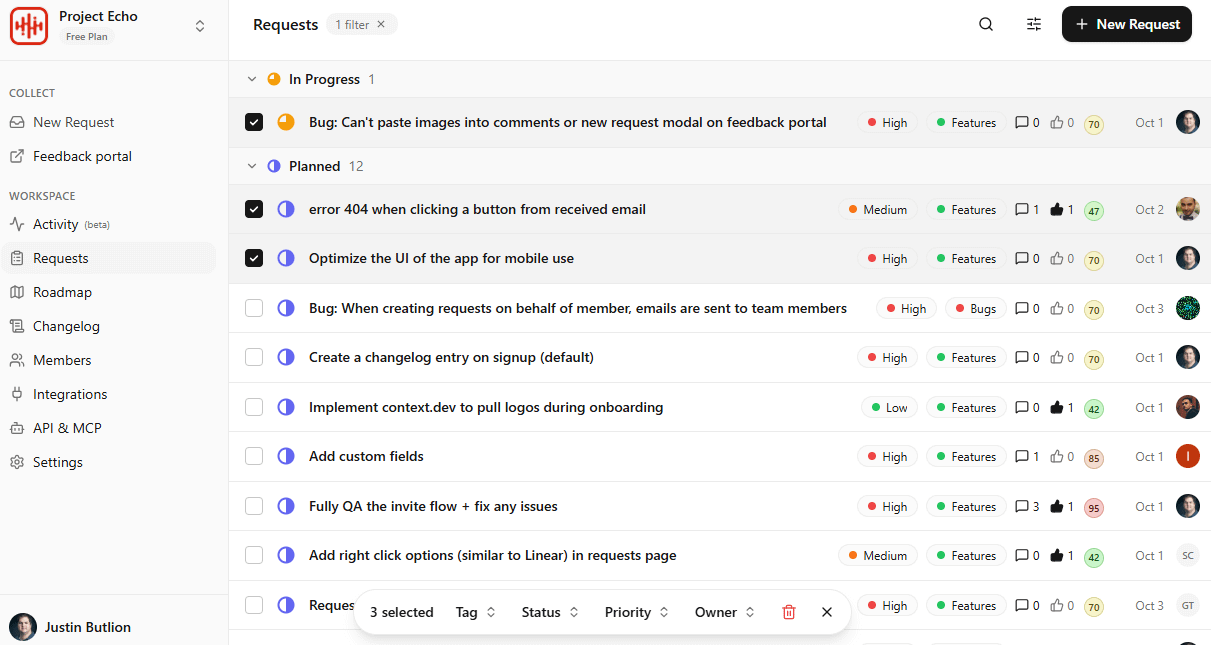
For now I’m happy with the homepage and will keep this version running for at least the next 6 weeks to see how it performs.
The one piece I’m still missing is social proof which will come next.
Even though the signup count still hasn’t moved, I feel a lot better about things and now just need to give it some time.
My focus shifts again to driving eye-balls to Project Echo and in a few weeks I’ll know if this new positioning makes a difference.
Enhancements to the Open page
This past week I also made a number of improvements to the Project Echo Open page.
The biggest change is the inclusion of a “Recent activity” live feed showing anonymized activity across all the Project Echo workspaces.

I got this idea after adding a similar UI to the Project Echo app.
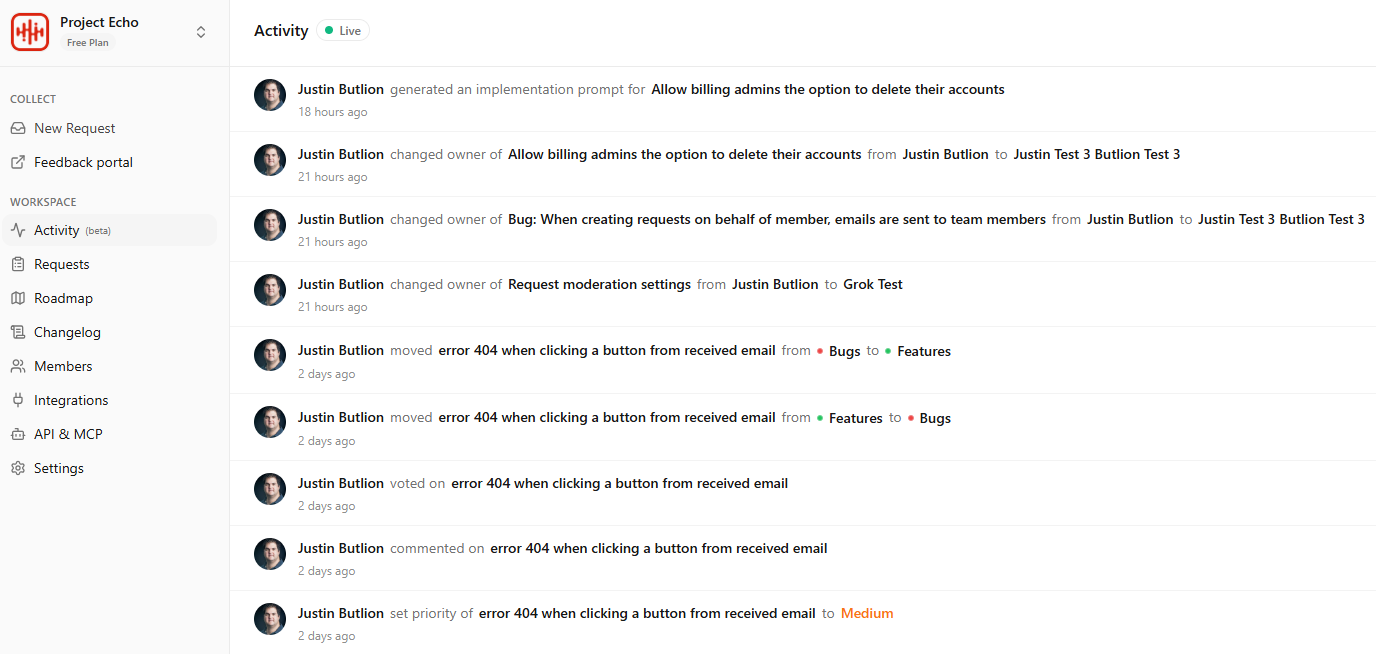
I’m a fan of this type of feature, especially in platforms where different individuals can take action and you aren’t necessarily aware of those actions. This UI allows admins to stay on top of everything going on in their workspace.
In addition to the new activity section, I also changed the P&L section to include the actual expense line items. Previously it was grouped by category only which isn’t that helpful. Now visitors to the Open page can see the exact items I’m spending money on each month.

Project Echo’s first fully integrated user, ibuildinpublic

A few weeks ago I connected with Ehsan Yazdanparast, the founder of ibuildinpublic, a new community for people that build in public.
Ehsan signed up to Project Echo and was interested in using it to collect feedback from early users of ibuildinpublic.
After a demo call, and a follow up call to help Ehsan set up his workspace and integrate Project Echo into his site, he was ready to start collecting feedback from his users.
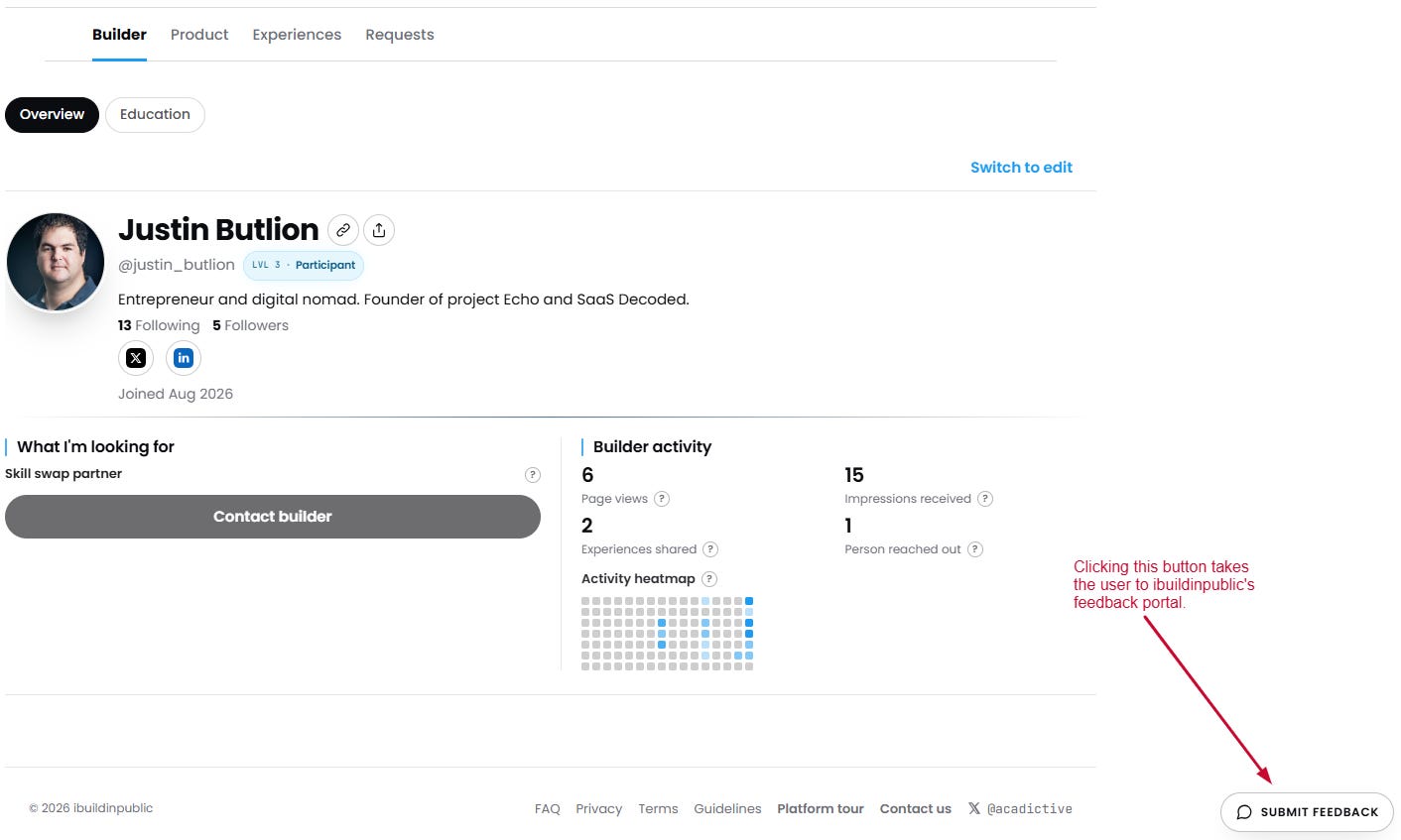
Ehsan added a prominent “Submit Feedback” button on every page within the website which takes users to ibuildinpublic’s feedback portal.

Since ibuildinpublic has Project Echo’s embed code on each page of his web app, only logged in users who get to the feedback portal can actually engage with it.
Ehsan has sent me a bunch of useful feedback for improving Project Echo which is extremely valuable. I’ve returned the favor by using the new feedback collection funnel set up using Project Echo.
ibuildinpublic goes live soon and I can’t wait to see how Ehsan’s users engage with Project Echo and help him improve the site.
If you build in public and looking for a place to interact with other builders, then make sure you check out ibuildinpublic and join the waitlist.
Project Echo’s first AI feature
The last big Project Echo news item is that a few days ago I completed the development of Echo’s first AI feature.
The feature allows users to generate a detailed implementation prompt from any of their requests either manually, or via a dedicated MCP tool.
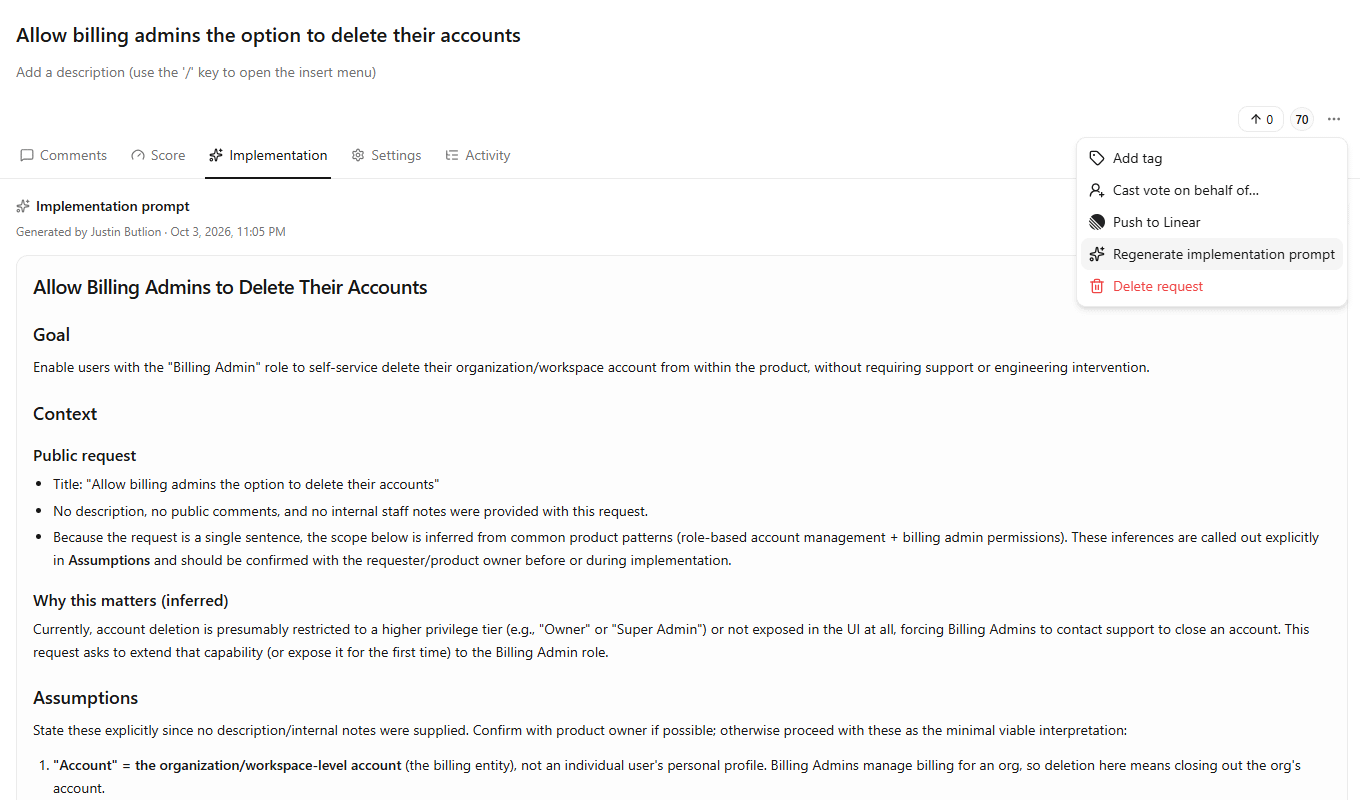
The idea is that once a user is ready to implement a request, he needs to write a prompt to his coding agent to implement it. Now with a click of a button, that prompt can be written automatically for the user.
The way it works is that Echo sends the title, description, comments and internal notes of the request to Claude and in return we get a detailed implementation prompt. The prompt can be regenerated once new information becomes available.
The cool thing is that the implementation prompt can be pulled directly into Cursor, Claude or any coding tool via Project Echo’s MCP server.
Right now it costs about 4c per generated prompt so I will have to limit the usage of this feature on the free plan but for now with little activity in Echo, I’m not going to block it.
This feature is meant to lean heavily on the new positioning and provide a way for developers to turn feedback into PRs quickly without leaving Cursor or Claude. Time will tell if its a hit.
Well friends, that’s it for this week. I’ll see you in the next one.
Justin
PS: I just published a detailed guide on how I use Grok Bot on my other Substack, Coffee + Revelation. If you aren’t using Grok Bot and want to know how I use a team of 8 bots to help me grow my businesses, make sure to check it out.